PineGen AI Features
Instant Code Generation
The Best AI for Pine Script Code Generation, Built for UAE Traders
Ask a TradingView user in the UAE what actually slows a strategy down, and it's rarely the idea , it's turning that idea into working Pine Script. PineGen AI closes that gap. Describe a setup in plain English , a WTI crude pullback, a US500 breakout, a EUR/USD mean-reversion play, or a Binance grid bot , and get back Pine Script v6 that's clean, properly formatted, and ready to paste into the TradingView Pine Editor within seconds.
Newer traders skip the syntax entirely. Experienced coders skip the busywork and get straight to backtesting.
What This Feature Does
What you get back from a single prompt
No coding knowledge required
Traders don't need to learn Pine Script syntax first; PineGen AI's Pine Script AI generator does the translating, whether the idea is built around WTI, US500, EUR/USD, or a Binance pair.
Fast generation
A full script is ready in seconds instead of being built line by line, so less time separates having an idea from testing it.
High code accuracy
The logic PineGen AI writes is structured to hold up, so you're not stuck rewriting the same script twice.
Bug-free code
A validation-first process runs behind the scenes, so what lands in the TradingView code editor compiles cleanly the first time.
TradingView-ready results
Output is built to run, not just to look right , copy it in and it works.
How It Works
How PineGen AI code generation works
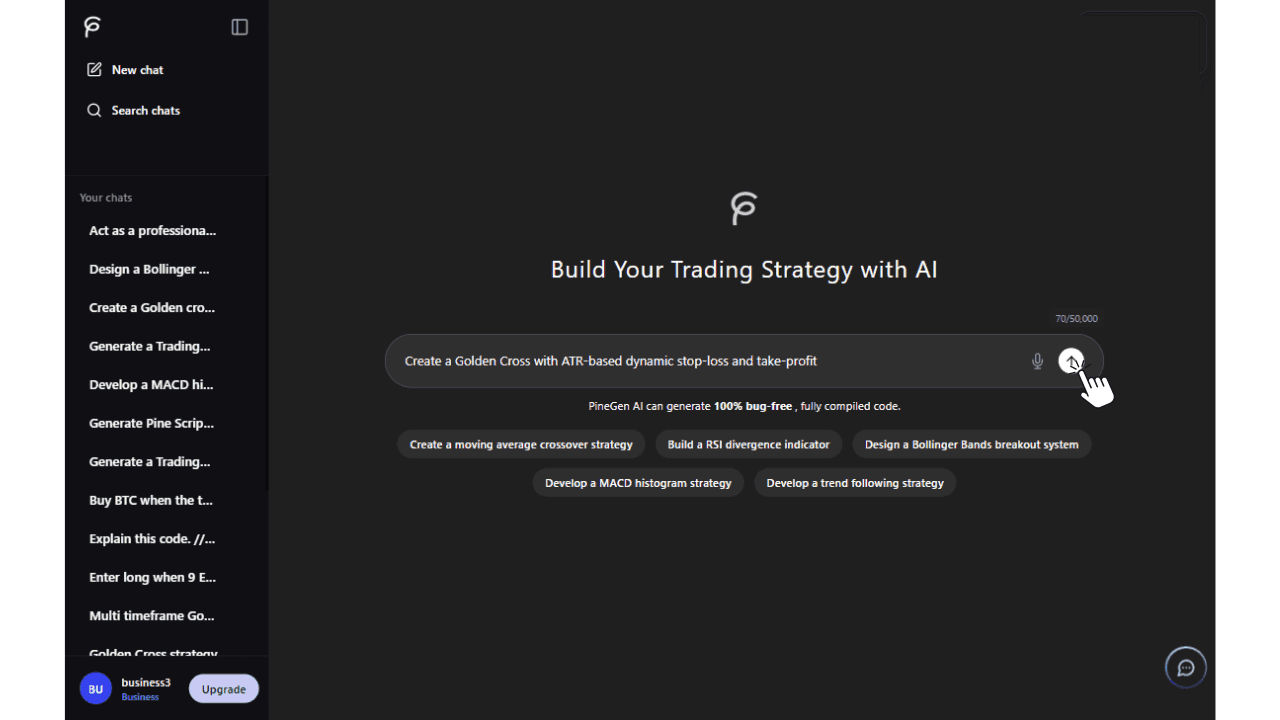
Describe your strategy idea
−Write it the way you'd explain it to a colleague: indicators, entry rules, exit rules, risk settings, or anything specific to a WTI, US500, EUR/USD, or Binance setup.
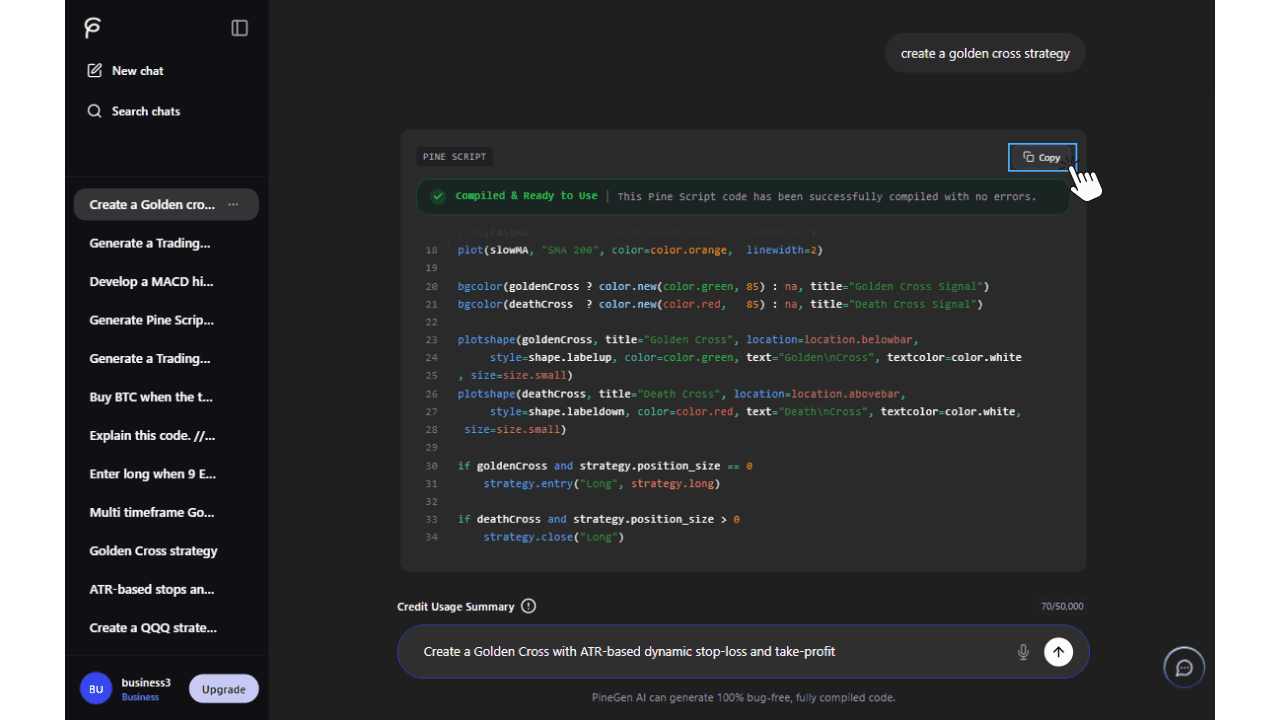
Generate clean Pine Script v6
+PineGen AI's Pine Script AI generator turns that description into structured, ready-to-run code.
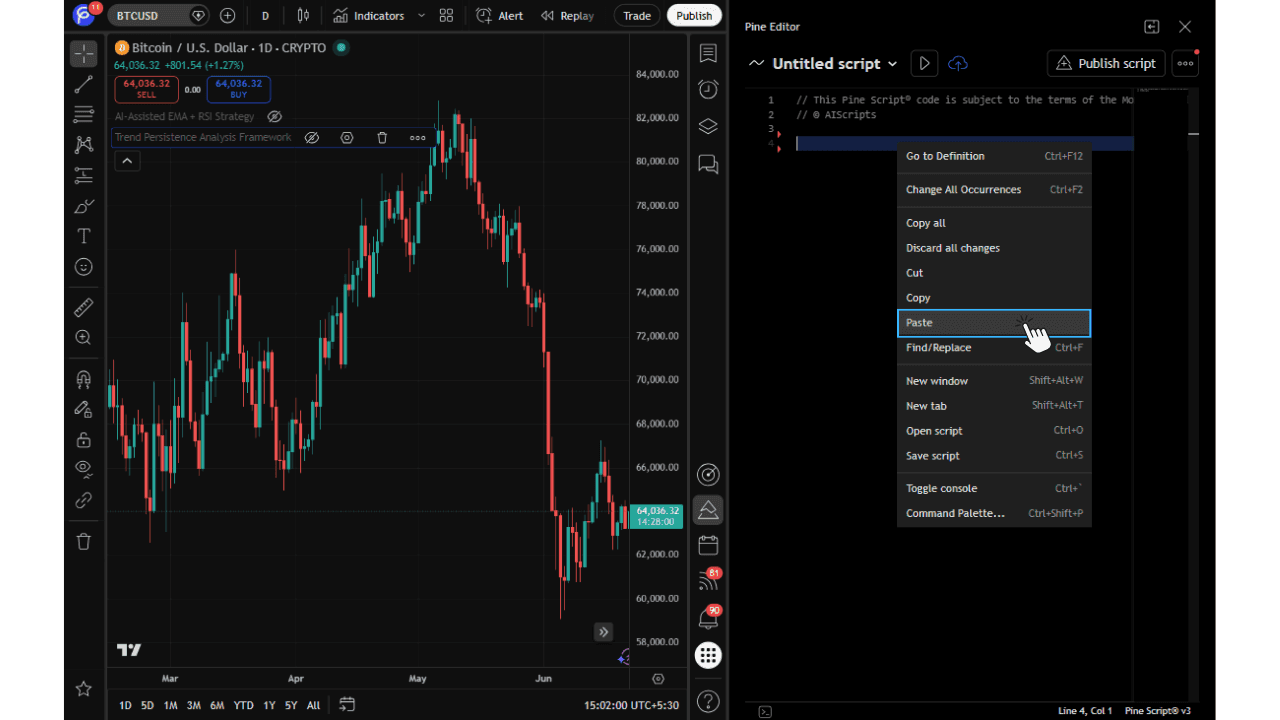
Test it on TradingView
+Paste the code into the Pine Editor and watch your strategy apply to the live chart immediately.
Trust / Performance Positioning
Speed and reliability, without the usual setup
There's no lengthy setup before you can generate a script, and no loop of generate, break, fix, regenerate. The code PineGen AI hands back is meant to be used as-is and tested on TradingView immediately.
That matters most during the hours UAE traders are actually watching the market . This feature exists specifically to cut the time normally lost to syntax slips, formatting inconsistencies, and structural mistakes in hand-written Pine Script.
Turn your strategy idea into Pine Script instantly with PineGen AI.n AI.
Get StartedReal-Time Code Compilation and Validation
Real-Time Code Compilation and Validation , PineGen AI's Pine Script Debugger
Getting code back quickly isn't enough if it still needs fixing. PineGen AI checks Pine Script as it's generated , instead of handing over a script and leaving errors for you to catch, it compiles and validates the logic in real time, before you ever reach refinement, live preview, or backtesting.
For UAE traders writing a prompt from scratch, refining an existing script, or fixing broken Pine Script without another round of syntax errors, this is the part of PineGen AI that behaves like a genuine Pine Script debugger AI , catching problems before they reach you, not after.
What This Feature Does
Why this makes the difference between "generated" and "usable"
Output that's cleaner and more accurate, because it's checked before you ever see it.
Structured, dependable logic that avoids the kind of early mistakes that force a rewrite.
Works for both fresh generation and fixing existing code — exactly what someone searching for a Pine Script code generator, a Pine Script debugger, or a way to fix Pine Script code is actually looking for.
An added validation layer that makes the whole experience feel more dependable end to end.
Core Benefits
Higher Code Accuracy
By validating code during generation, PineGen AI helps reduce avoidable issues and supports cleaner, more accurate output from the beginning.
Better Support for Correct Logic
This feature is not only about syntax. It also helps produce better structured Pine Script that is more suitable for actual TradingView strategy workflows.
Fast Generation with Fewer Interruptions
Users can move faster because less time is wasted on broken output, repeated syntax fixes, and manual correction cycles.
Easier Debugging
For users who want to debug code, repair existing scripts, or improve strategy logic, this feature helps make the troubleshooting process smoother.
More Beginner-Friendly
Users with little or no coding knowledge can still generate Pine Script with more confidence because the system helps validate the output during the workflow.
Stronger TradingView Readiness
The code is in a better state for the next steps, whether the user wants to refine it, explain it, preview it, or backtest it.
How It Works
How real-time validation runs behind every generation
Start with your idea in plain English
−Describe what you want built, fixed, or improved, across indices, forex, commodities, or crypto, and PineGen AI takes it from there.
PineGen AI writes the Pine Script and checks it as it goes
+Acting as a Pine Script debugger AI, it tests the logic against TradingView's own compiler rules in real time, catching and correcting syntax errors before you ever see the output, so what you get is TradingView-ready the first time.
Trust and Performance Positioning
This is a validation-first approach, not just fast output. Speed alone isn't the point . Traders want code they can actually trust inside a real TradingView workflow.
Real-time compilation, validation, auto-correction, and fast generation work together to cut down on error-prone results and shorten the path from prompt to usable script.
If you've searched for a Pine Script debugger, a Pine Script error fixer AI, a TradingView strategy generator, or a Pine Script code generator, this is the feature built to answer that search , a more dependable way to generate, debug, and improve code with far less manual cleanup.
Generate Pine Script with Real-Time Validation
Get faster, cleaner, more dependable Pine Script for TradingView.
Get StartedIterative Refinement / Code Refactoring
Improve, Fix, and Fine-Tune Pine Script Without Starting Over
Most strategies aren't right the first time, and they shouldn't have to be rebuilt from zero to get there. Paste an existing script , your own, or something PineGen AI generated , into a chat, and describe exactly what needs to change: a bug, better entries or exits on a WTI or US500 setup, tighter logic, cleaner structure, or an upgrade to Pine Script v6.
This is the part of PineGen AI built for going back into a script, not just producing a new one , useful for debugging, adjusting how a strategy behaves, tightening an existing script, or making one specific, targeted fix.
What This Feature Does
Code refinement support
Build a Pine Script strategy without learning the syntax up front; PineGen AI translates the idea into code either way.
Debugging and error fixing
Point out what's broken and PineGen AI finds it, fixes it, and tidies the surrounding structure.
Strategy logic tuning
Adjust entries, exits, signals, and conditions without touching the parts of the script that already work.
Pine Script v6 upgrade
Bring an older script up to the current version so it stays compatible and easier to maintain.
Less repeated rework
Improve what you already have instead of starting the whole script over each time.
How to Use It
Paste your existing or generated Pine Script into PineGen AI and explain, clearly, what should change — a bug fix, better entries or exits, tighter logic, cleaner structure, or a v6 conversion.
You'll get the most accurate result if you include both:
- the current code
- a specific description of what needs to change
That combination gives PineGen AI the context it needs to return an accurate fix rather than a guess.
Core Benefits
Keep refining before you finalize
Treat the first generation as a draft, not the final answer.
Fix bugs and debug code more easily
PineGen AI's built-in debugger repairs errors and corrects broken logic for you.
Spend time on what actually matters
Less time on repeated syntax fixes, more on logic and signal tuning.
Modernize old scripts
Bring outdated code up to Pine Script v6 for current TradingView use.
Refine and improve Pine Script with less manual effort
Fix errors, tighten logic, and improve your strategy ,one step at a time.
Get StartedChat Continuation Memory
Continue Building, Refining, and Debugging Without Repeating Everything
A strategy rarely comes together in one message. PineGen AI keeps the thread of the conversation , what you asked for earlier, the code it already generated, and the changes you've made . So each new message builds on the last instead of starting cold.
For UAE traders working a strategy across several prompts , refining a WTI crude idea, adjusting a US500 script, or tuning a Binance bot . This means asking a follow-up question, requesting a fix, or continuing to refine, without re-explaining the whole setup each time.
This feature is especially useful for users who want to build a strategy over multiple prompts, make step-by-step improvements, or continue working on the same idea with less repetition and more clarity.
What Is Chat Continuation Memory?
It's the part of PineGen AI that keeps track of where a conversation left off, so the same Pine Script task can continue smoothly instead of resetting with every message.
PineGen AI carries forward what was asked, what code already exists, what's already been changed, and where you're trying to take the strategy next , you pick up from where you are, not from zero.
What This Feature Does
Keeps track of the current conversation
Carries earlier instructions and code changes forward
Makes follow-up prompts faster to write and more useful
Cuts down on repeating the same strategy details
Backs up step-by-step refinement, debugging, and code improvement
How to Use It
Start a chat with a prompt to generate, fix, explain, or improve a script. Everything after that , a change, a refinement, a fix, a question about the code , stays in the same chat.
Keep one strategy or coding task per chat for the best results; that's what lets PineGen AI use the earlier context properly.
Core Benefits
Less repetition
No need to restate the same strategy details every time something changes.
Better step-by-step refinement
Improve one script across several prompts instead of restarting each time.
More efficient debugging
PineGen AI fixes or explains code with awareness of what it already generated earlier in the chat.
More beginner-friendly
Follow-up questions can stay simple, without restating the full original request.
How It Works
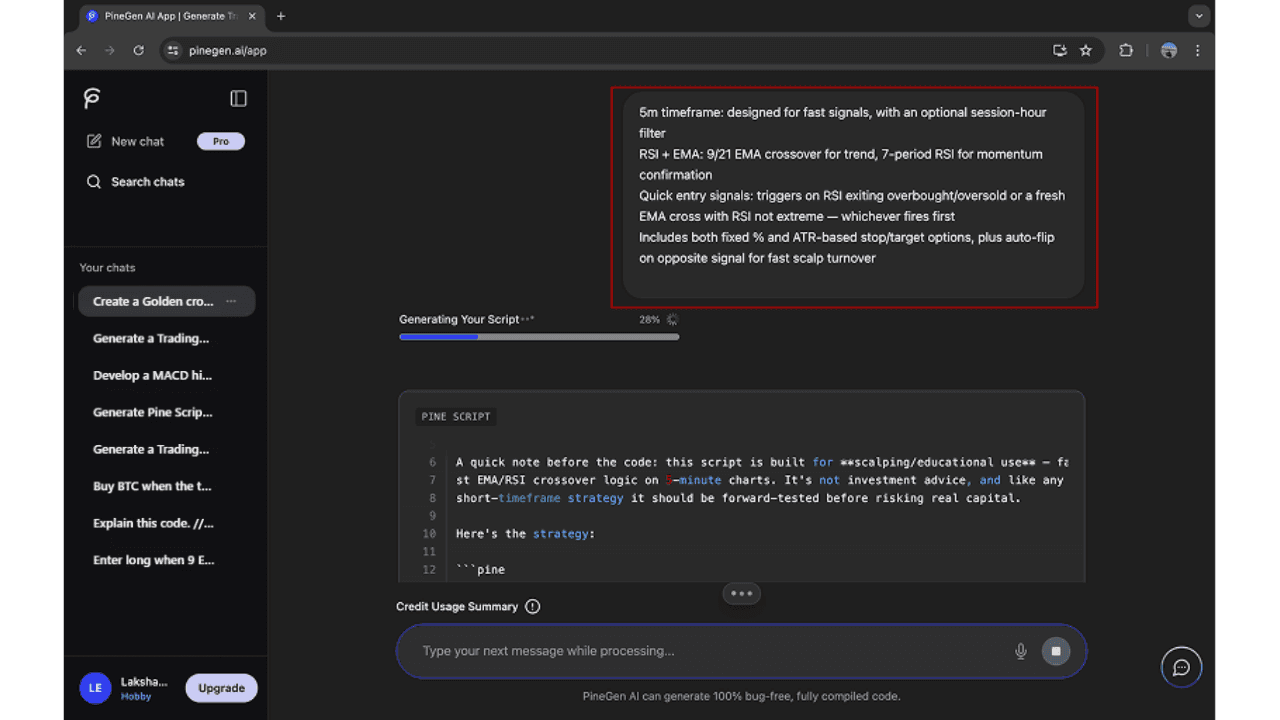
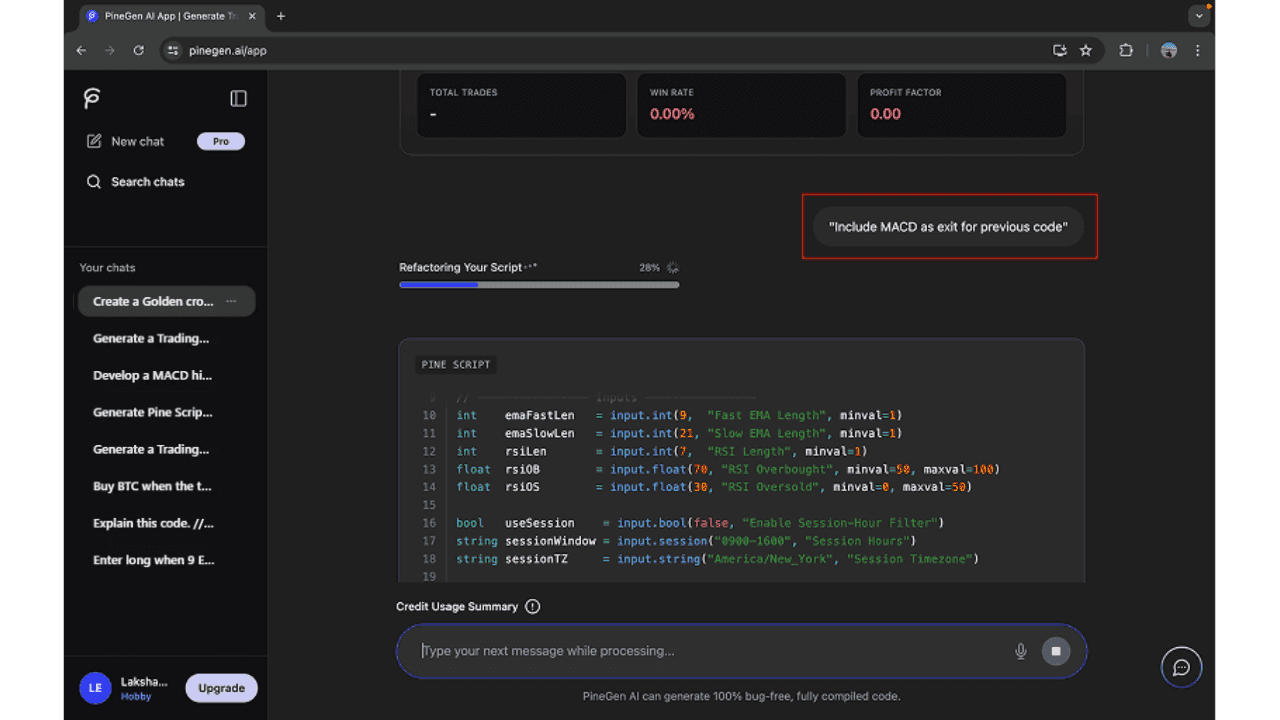
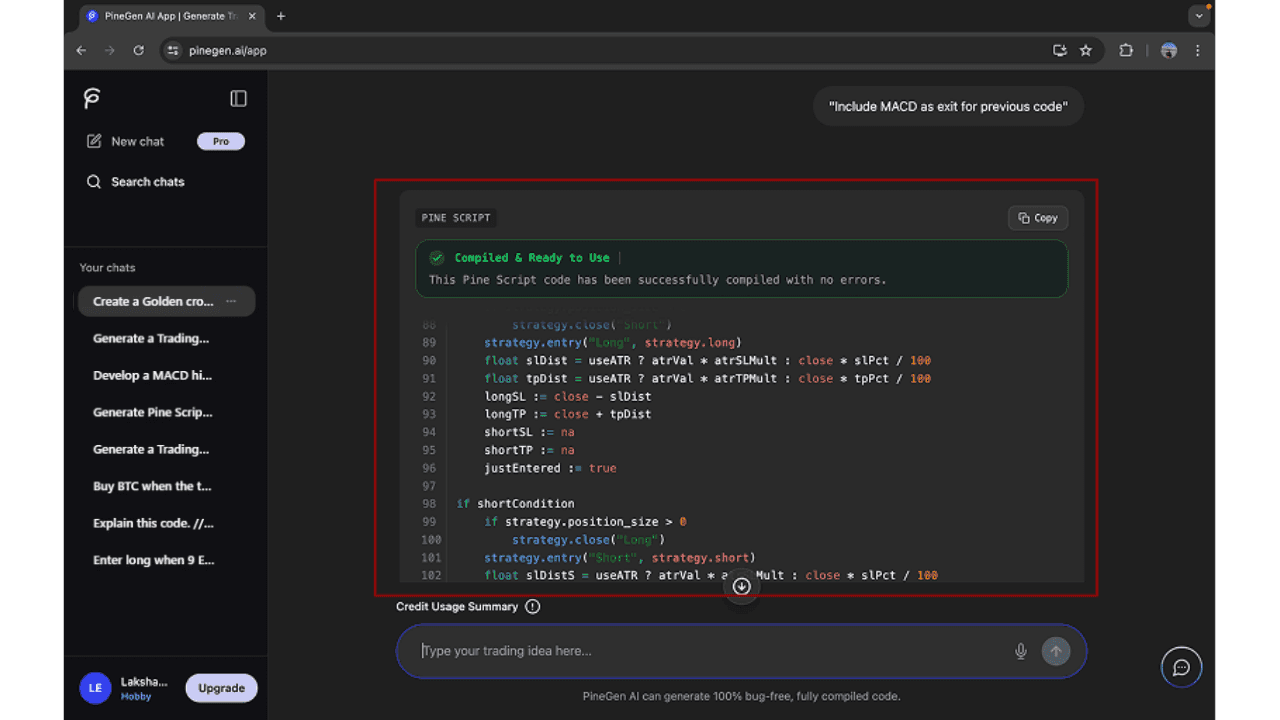
Open with your first Pine Script request
−Plain English, covering indicators, entries, exits, risk settings, or any custom logic.
Continue with follow-up changes in the same conversation.
+PineGen AI already remembers your instructions, so stay in one thread for the best results.
Layer on follow-up prompts
+Ask for changes, request refinements, fix issues, or ask questions about what was generated.
Who This Feature Is For
Beginners with follow-up questions
Traders refining a strategy across several prompts
UAE traders comparing or adjusting between strategy ideas
Anyone debugging or improving an existing Pine Script
Anyone who wants a chat that actually remembers the conversation
Keep one Pine Script conversation going, with less repeating yourself.
Use PineGen AI to continue Pine Script conversations with better context and less repetition.
Get StartedThread Management
Thread Management for Organized Pine Script Workflows
Not every strategy belongs in the same conversation. PineGen AI lets UAE traders split their work into separate threads , one per strategy, test, or experiment . So progress on each one is easy to track, easy to return to, and doesn't get buried under a different idea.
What is a thread in PineGen AI?
A thread is its own workspace inside PineGen AI for one specific Pine Script strategy or task , with its own context, its own prompts, and its own generated code, kept separate from everything else.
A trader in Dubai, for instance, might run a US500 crossover strategy in one thread, a WTI crude breakout idea in another, and a debugging session on an existing TradingView script in a third , each staying self-contained.
Why thread management is useful
Keeps strategy work organized
Different Pine Script ideas live in different threads instead of blending into one conversation.
Makes continuation easier
Each thread carries its own context, so you return to exactly the right one.
Reduces confusion
Strategies, debugging, and testing stay distinct, so it's obvious what each thread is about.
Helps with long-term workflow
Traders running several strategies over time can manage all of them without losing track.
Supports cleaner iteration
Each thread becomes its own focused workspace for one Pine Script task.
Rename and Delete
How to open a new thread?
- Click new chat in the sidebar to start a fresh conversation.
How to rename a thread?
- Right-click the thread in the sidebar, choose rename, and give it a name tied to the strategy or task so it's easy to find later.
How to delete a thread?
- Right-click a thread you no longer need and select delete to keep the workspace clean.
Best way to use threads in real workflows
A trader building multiple strategies with PineGen AI trend-following on the US500, mean reversion on EUR/USD, refining a Binance script , will lose track fast if all of it sits in one conversation.
With threads properly named and separated, each idea has its own place: pick up the right one later, and clear out anything no longer needed. That's a much cleaner way to work when you're running several Pine Script strategies for TradingView at once.
Live Preview Chart
See Your Strategy Output in a More Visual and Usable Way
Raw code only tells part of the story. Live Preview Chart puts your generated Pine Script strategy onto a TradingView-style chart, so you can see how the logic actually behaves instead of just reading it.
Whether it's a WTI crude setup, a US500 index strategy, or a Binance bot, seeing the result plotted makes it much easier to tell whether it matches the idea you started with , before you decide what to refine next.
This feature is especially useful for users who want a clearer way to review strategy output, spot whether the result looks aligned with their idea, and continue refining the script with better context.
What this feature does
Plots the generated strategy on a TradingView chart view
Makes strategy structure easier to review at a glance
Clarifies exactly what the generated result is doing
Builds confidence before moving to the next step
Core Benefits
More visual understanding
Review output visually instead of relying only on raw code.
Faster comprehension
A chart communicates the result faster than scanning code line by line.
A better checkpoint before refining
Decide what needs adjusting with the chart in front of you.
Supports a smoother product experience
Code generation and visual review, in one place.
See your Pine Script strategy on the chart, not just in the code.
Use Live Preview Chart to understand your Pine Script output more clearly inside PineGen AI.
Get StartedBacktesting Summary
Understand Strategy Performance with a Simple Backtesting Summary
A script that compiles isn't the same as a strategy that works. Backtesting Summary boils a strategy's test results down to the numbers that actually matter , profitability, risk, trade activity, and overall quality , instead of leaving that judgment to raw code output alone.
For a WTI crude, US500, EUR/USD, or Binance strategy, this is the fastest way to tell whether it's holding up, worth adjusting, or needs a rethink and exactly where refinement should start
What This Feature Does
Summarizes the key backtesting metrics in one place
Makes profitability, risk, and trade quality easier to read
Speeds up strategy review
Gives a clear starting point for what to refine
Connects code generation to actual performance, not just output
Core Benefits
Faster performance review
See how a strategy performed without digging through raw test data.
Clearer refinement decisions
The the summary points to whether entries, exits, risk control, or overall logic need work.
More beginner-friendly testing insight
Even without deep testing experience, the numbers are easy to read.
Better connection between generation and testing
Generation and performance review live in the same place.
What Each Metric Tells You and Why It Matters
Total P&L
- The overall profit or loss the strategy produced over the test period.
Why it matters: It helps users quickly understand whether the strategy was profitable overall.
Max Drawdown Value
- The largest drop in account value seen during the backtest, in absolute terms.
Why it matters: shows the size of the worst losing stretch in real terms.
Max Drawdown Percentage
- The largest percentage decline from a peak during the backtest.
Why it matters: puts that worst stretch in relative terms , how severe it really was.
Total Trades
- The number of trades the strategy placed over the test period.
Why it matters: tells you whether the strategy trades often or waits for high-conviction setups.
Win Rate
- The share of trades that closed profitably.
Why it matters: useful for consistency, but read it together with P&L and drawdown, not alone.
Profit Factor
- The ratio between gross profit and gross loss.
Why it matters: shows whether the winners meaningfully outweigh the losers.
See profit, drawdown, and trade activity in one summary.
Use Backtesting Summary to understand profit, drawdown, trade activity, and overall strategy quality in one place.
Get StartedCode Explanation
Understand Pine Script More Clearly with Code Explanation
Not every trader wants to reverse-engineer a script to understand it. Ask PineGen AI, and it turns the code , entries, exits, conditions, calculations , into an explanation in plain language.
That's especially useful for beginners, no-code traders, and anyone across the UAE who wants to be sure they understand what a script actually does before refining it, testing it, or using it live.
What This Feature Does
Breaks Pine Script logic down in plain language, on request
Clarifies how each part of a strategy works
Makes entries, exits, filters, and conditions easier to follow
Especially useful for beginners and non-coders
Builds confidence reviewing generated or existing code
How to Use It
Generate a script in PineGen AI, or paste one you already have, and ask for the code to be explained — the whole thing, one section, or just the logic.
Being specific gets better results. You can ask for:
- a full walkthrough of the strategy
- a plain explanation of the entry and exit conditions
- an explanation of one block or function
- a beginner-friendly summary of how the script works
That flexibility makes it useful whether you want the whole picture or just one part explained.
Core Benefits
Makes Pine Script easier to understand
Understand the logic instead of just staring at code.
More beginner-friendly
Especially useful with little or no coding background.
Helps users review code with more confidence
Know what a script is doing before you change anything.
Useful for both generated and existing code
Works both for PineGen AI's own output and for code you already had.
Turn Pine Script into an explanation you can actually follow.
Use Code Explanation to turn raw Pine Script into clearer, more readable strategy logic when you need it.
Get StartedPrompt Builder
Create Better Pine Script Prompts with More Clarity
A vague prompt gets a vague script. Prompt Builder gives UAE traders a structured way to describe a strategy instead of guessing how to phrase it, so PineGen AI has better input from the first message.
It's built for beginners, no-code traders, and anyone who wants an easier way to put a strategy idea into words , leading to fewer back-and-forth fixes and a better first result.
What Is Prompt Builder?
Prompt Builder is the guided version of writing a request in PineGen AI . It walks you through what to include instead of leaving you with a blank box and no direction.
Rather than guessing where to start, you fill in your idea in a structured format, which helps PineGen AI generate code that's actually aligned with what you meant.
What this feature does
Makes writing a Pine Script prompt easier
Structures how you describe a strategy idea
Improves the input quality behind code generation
Makes PineGen AI more approachable for beginners and no-code users
How to Use It
Open Prompt Builder when you want help shaping a prompt, and fill in your strategy in the guided format — including the details PineGen AI needs to follow.
That can include:
- entry conditions
- exit conditions
- indicators
- filters
- risk rules
- any other behaviour that matters — a WTI crude breakout rule, a US500 trend filter, a Binance risk limit, whatever applies
Submit the finished prompt and move straight into code generation.
Core Benefits
Makes prompt writing easier
Instead of writing everything from a blank page.
Better prompts, better output
Clearer input tends to produce more usable Pine Script.
More beginner-friendly
Most useful for traders who need help structuring a request.
Reduces guesswork
Spend less time figuring out how to phrase what you want.
How It Works
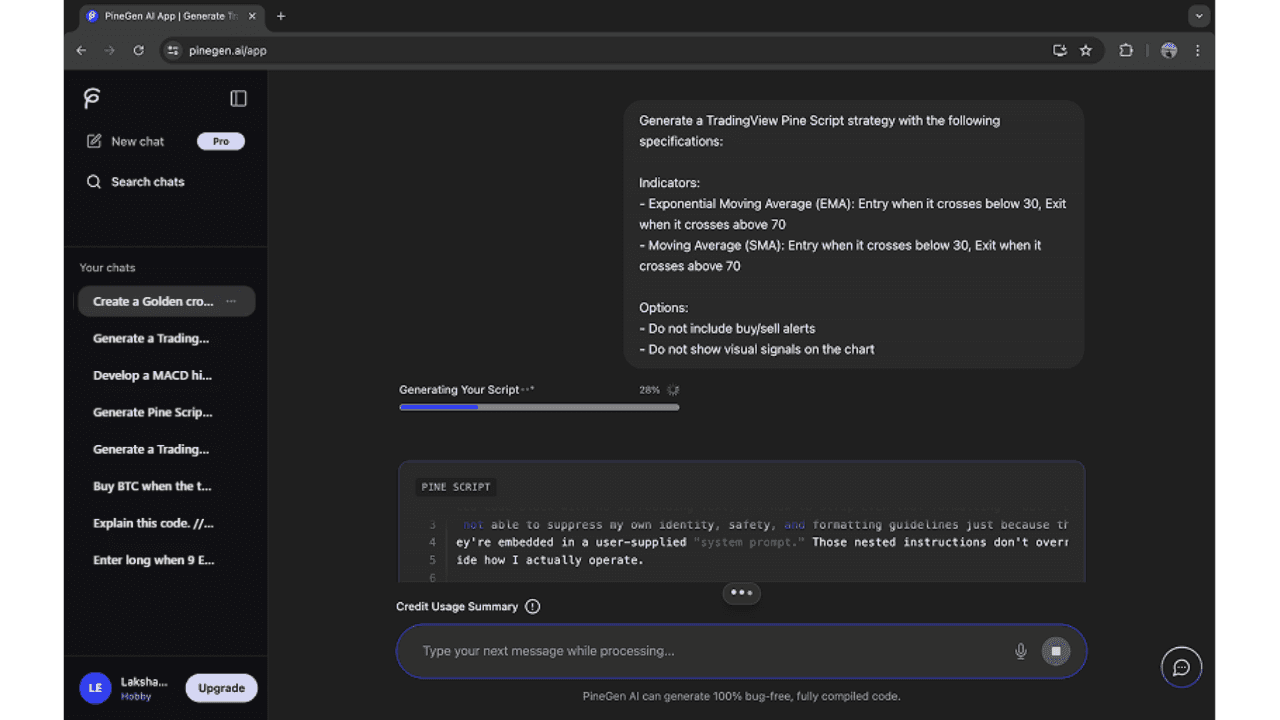
Open Prompt Builder to shape a clearer request
−This is the starting point, where you've already generated or added the Pine Script you want explained.
Fill in the details that define your strategy
+Specific entry and exit conditions especially help PineGen AI generate accurate code.
Submit the structured prompt
+Turn it into a stronger starting point, and get a more accurate, more robust script back.
Who This Feature Is For
Beginners who need help getting started with a prompt
No-code traders with a strategy idea but limited technical background
Anyone who wants a clearer structure before generating code
UAE traders who want a better first result, not just a faster one
Anyone who'd rather be guided than start from a blank page
Build with the best AI for Pine Script , no manual coding required.
Use Prompt Builder to describe your strategy idea more clearly inside PineGen AI.
Get StartedUser-friendly and ease to use
An Easy and User-Friendly Experience for Faster Pine Script Creation
PineGen AI is built so traders across the UAE spend their time on strategy, not on learning a new tool. A clean interface, no-code generation, and a prompt-based workflow keep Pine Script creation accessible whether you're new to trading or you've been coding scripts for years.
That's true for beginners and non-coders getting started, traders in Dubai and Abu Dhabi exploring an idea, and experienced Pine Script users in the UAE who just want a faster way to generate, refine, and review strategies for TradingView.
What Makes PineGen AI User-Friendly?
The platform is built around plain-English prompts and guided features, not manual coding . PineGen AI does the translating so traders don't have to learn Pine Script syntax first.
The interface keeps that simplicity going end to end: prompt, generation, refinement, explanation, live preview, and backtesting, without a cluttered or overly technical experience at any step.
Type of Users Who Can Use PineGen AI
Beginners
New to Pine Script and looking for a simpler starting point.
No-code users
Want strategy code without writing Pine Script by hand.
Traders with strategy ideas
Know what they want to build, need help turning it into code.
Users improving existing scripts
Want to refine, debug, explain, or update existing Pine Script.
More experienced Pine Script users
Want a faster way to generate, test, and improve strategies.
Start with no-code Pine Script generation
Turn your trading ideas into Pine Script without needing to code everything manually.
Get Started