
8 AI Trading Tools for Pine Script Compared: Pineify, LuxAlgo, TradeSage, and More
Publish Date : 8 / 3 / 2026 • 2 mins read
Last Updated : 10 / 30 / 2026

Why This Comparison Matters More Than It Did Eighteen Months Ago
In August 2025, searching for a pine script AI tool returned two or three meaningful results. By mid-2026, there are eight tools with live products, real pricing pages, and actual users, plus two general-purpose AI assistants whose custom versions now rank in the top ten search results for "pine script ai" even though their primary products have nothing to do with TradingView.
The expansion matters because the tools are not all doing the same job. A pine script AI tool can mean a code generator that validates output against TradingView's compiler, or it can mean a dropdown form that exports templates with no AI logic involved at all. It can mean a standalone web app, a Chrome extension that lives inside TradingView's own editor, a full trading platform where code generation is a secondary feature, or a domain that was registered, partially built, and then abandoned while the landing page still claims to be active.
For a trader who wants to build and backtest a working TradingView strategy, the category spread means the tool you choose determines how much of your time goes toward debugging output that should have been correct on arrival. The tool you choose also determines whether the Strategy Tester results you trust are based on honest non-repainting logic or on signals that benefited from future bar data during the simulation.
Understanding the difference between a pine script AI that validates versus one that only generates is the single most important thing a trader can do before committing to any tool in this category, because the failure mode of generation without validation is invisible at the point of output and expensive at the point of live trading.
This piece covers all eight tools with meaningful live presence, using the same evaluation criteria for each. Two previous comparisons covered four of these tools, ChatGPT, Pineify, Pine Script Wizard, and GetPineScript, in a head-to-head code quality test [medium] and in a broader review of the AI Pine Script generator landscape. This post extends that coverage to five tools those pieces did not cover, LuxAlgo, TradeSage, HorizonAI, RoboQuant, and PineGenerator.com, and updates the Pineify and Pine Script Wizard assessments with the most current data available as of July 2026.
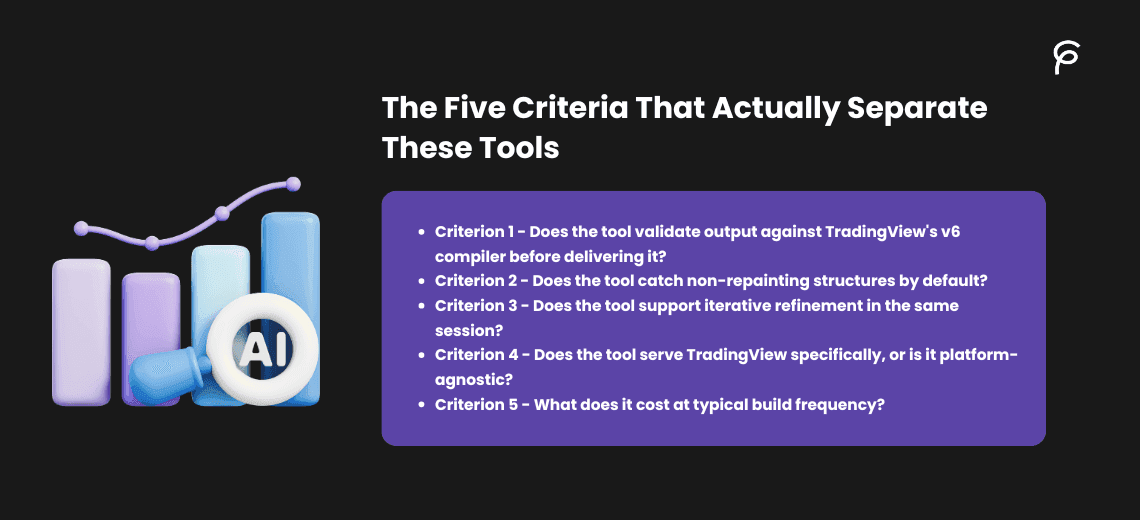
The Five Criteria That Actually Separate These Tools
Before the tool-by-tool breakdown, the evaluation framework needs to be clear, because several of these tools advertise similar capabilities in different ways, and the word "AI" on a landing page means something meaningfully different depending on which tool is using it.
Criterion 1 — Does the tool validate output against TradingView's v6 compiler before delivering it?
This is the most important technical criterion and the most commonly skipped step in the category. A Pine Script tool that generates code and immediately shows it to the user without running a compiler check will produce output that contains errors the user must find and fix manually. For traders without Pine Script coding experience, these errors are indistinguishable from correct code until the script throws a compile error inside TradingView's Pine Script Editor. What a live chart preview and in-tool backtesting summary look like when a tool does this correctly is the baseline standard every tool in this category should be measured against, not a differentiating feature that only the best tools have.
Criterion 2 — Does the tool catch non-repainting structures by default?
A tool can generate code that passes TradingView's compiler and still produce backtest results that are significantly more optimistic than live trading will show, because the strategy accesses future bar data during the simulation while appearing to evaluate only confirmed bars. The two technical mechanisms behind this are missing barstate.isconfirmed on entry logic and missing barmerge.lookahead_off on higher-timeframe request.security() calls. Both of these failure modes are covered in detail in the repainting explanation. A tool that screens for these patterns as part of generation catches the most expensive category of error in backtesting, the kind that shows up as a profitable simulation and a losing live strategy.
Criterion 3 — Does the tool support iterative refinement in the same session?
Building a strategy is rarely a single-prompt exercise. A first-draft EMA crossover with ATR stops needs a session filter. The session filter works but fires too early in the morning. The entry needs an RSI confirmation. The RSI threshold needs adjusting. A tool that requires re-describing the entire strategy for each of these changes imposes a real time cost, and introduces re-generation risk at each step, where a previously correct element gets dropped or modified in the new generation. A tool with persistent session memory builds each refinement on the already-validated prior version without losing previously correct logic.
Criterion 4 — Does the tool serve TradingView specifically, or is it platform-agnostic?
TradingView's Pine Script v6 has version-specific syntax, function names, parameter signatures, and structural rules that differ from MT5's MQL5, NinjaTrader's C#, and Python. A tool trained specifically on Pine Script v6 produces output that matches TradingView's current compiler requirements by default. A tool trained on a broader set of trading scripting languages, or on a historical corpus that includes heavy v4 and v5 examples, produces output that requires version correction before it compiles cleanly on TradingView. Understanding what a specialized pine script AI does that general tools cannot is the critical lens for evaluating tools that claim multi-platform support.
Criterion 5 — What does it cost at typical build frequency?
Monthly subscriptions, lifetime payments, token-based models, and free tiers with credit limits each make sense for different usage patterns. A trader who builds two or three strategies per month is better served by a subscription or free tier than by a per-token model that charges for every prompt. A trader building a permanent library of strategies across a long period might find a lifetime payment more economical than a subscription that accumulates over years. The pricing model is not a quality signal, it is a fit signal that depends on how frequently you build.
Pineify: The Closest Rival With the Broadest Scope
Pineify (pineify.app) is the closest direct competitor to PineGen AI by keyword overlap, 21 shared organic keywords as of July 2026, more than any other tool in this field, and the only tool in the comparison that has faster-growing traffic than PineGen AI. Its domain authority of 12 and estimated 2,870 monthly visitors place it in a similar scale tier, but the product itself is substantially different in scope.
Where PineGen AI is purpose-built specifically for Pine Script generation and validation on TradingView, Pineify has positioned itself as a full trading operating system. Its feature set extends well beyond code generation: a stock screener, an options flow and dark pool dashboard, a trading journal, and a finance AI agent sit alongside its Pine Script generation capability. It also supports MT5 through MQL5 output, meaning traders who run strategies across both TradingView and MetaTrader can use a single tool for both platforms.
On the backtesting side, Pineify's deep backtest reports include 16 or more KPIs, significantly broader than a standard Strategy Tester summary, along with Monte Carlo simulation for robustness testing. This is a genuinely more comprehensive backtesting feature set than most tools in the category offer.
The pricing model is the most unusual: Pineify offers lifetime access for a one-time payment ranging from approximately $99 to $259 depending on the tier, rather than a monthly subscription. For a trader who expects to use the tool consistently over multiple years, this is economically attractive. For a trader evaluating whether the tool fits their workflow before committing, the absence of a monthly option and the absence of a free tier makes the evaluation step more expensive.
Pineify's own model claims to outperform ChatGPT, Gemini, and Claude Opus on Pine Script generation tasks, a claim worth testing against the criteria above rather than accepting at face value. The relevant question is not whether its output is better than a general AI's, but whether it validates against TradingView's v6 compiler before delivery and whether it screens for non-repainting structure by default. Pineify does include backtesting capability, which implies some level of output validation, but the specific mechanism for catching the barstate.isconfirmed and request.security() failure modes is not stated on its public pages.
One technically significant feature: Pineify offers an MCP server, which means Claude or ChatGPT can call into Pineify's tools directly, effectively making it an AI-inside-an-AI layer for traders who use general AI assistants as their primary interface.
Who Pineify is for: Traders who want a single platform covering Pine Script generation, MT5 output, stock screening, and an options flow dashboard, and who are willing to pay a one-time fee rather than a monthly subscription. Traders who need only Pine Script for TradingView will find significant features they are not using.
Where it falls short: No free plan for initial evaluation. The breadth of features is a genuine advantage for some users and a distraction for traders who want only Pine Script on TradingView.
LuxAlgo: The Dominant Incumbent Where AI Is One Feature Among Many
LuxAlgo (luxalgo.com) is the dominant player in this comparison by every traffic and authority metric. Its domain authority of 33 compares against an average of 8 to 12 for the direct Pine Script AI generators. Its estimated 33,135 monthly visitors makes it approximately 12.5 times larger than PineGen AI by traffic. Its backlink profile, over 217,000 backlinks across more than 2,300 referring domains, reflects years of established presence in the trading software market.
The important context is that LuxAlgo is not primarily a pine script AI generator. It is a trading platform built around its own substantial indicator library, its core product is a suite of proprietary TradingView indicators covering market structure, oscillator suites, and custom signal overlays. AI Pine Script generation is one feature within that larger platform, added as the category grew, not the foundational capability around which the product was designed.
LuxAlgo's AI module, marketed as "Quant," builds strategies using LuxAlgo's own indicator library as a foundation. This is a meaningful architectural difference from tools that generate arbitrary Pine Script from plain-English descriptions. If your strategy uses standard technical analysis, EMAs, RSI, MACD, VWAP, LuxAlgo Quant may not generate those from scratch; it is more likely to integrate them into its own signal framework. This creates a significant advantage for traders already invested in the LuxAlgo indicator ecosystem, and a mismatch for traders who want to automate their own indicators or build strategies independent of a specific library.
LuxAlgo's backtesting module is described as "evidence before capital", a full backtesting capability that is part of the broader platform rather than a standalone strategy generator feature. Its live market data coverage across multiple asset classes and its prop-firm tool integrations are features with no equivalent in the smaller pine script AI generators.
The pricing is subscription-based with monthly and annual options; the specific rates are not published on its public page and require a direct check at luxalgo.com.
For traders who want to understand what you can actually build with a pine script AI tool that is purpose-built for custom strategy generation versus what LuxAlgo's indicator-library-based approach offers, the distinction is whether you are building on top of someone else's proprietary indicator logic or generating your own rules from scratch.
Who LuxAlgo is for: Traders already using LuxAlgo's indicator library who want AI to help translate those signals into automated strategies. Traders who want a comprehensive trading platform covering signals, strategy building, market data, and prop-firm support under one subscription.
Where it falls short: For a trader who wants to describe their own entry logic, "enter long when the 9 EMA crosses above the 21 EMA with RSI above 50 and price above the 50 SMA in the 9:45 to 11:00 AM Eastern session", into a standalone Pine Script v6 strategy, LuxAlgo Quant is a heavier tool than the task requires. The AI Pine Script component cannot be separated from the broader subscription.
TradeSage: The Chrome Extension That Lives Inside TradingView
TradeSage (tradesage.co) takes a fundamentally different distribution approach from every other tool in this comparison. Rather than operating as a standalone web application, TradeSage is primarily a Chrome extension that installs directly inside TradingView's Pine Script Editor, meaning you generate, refine, and optimize Pine Script code without leaving TradingView itself.
This is a meaningful UX advantage for traders who find tool-switching disruptive. Generating code in a separate app and then copying it into TradingView's editor is a context switch that creates friction in an iterative refinement workflow. TradeSage's extension approach eliminates that step entirely: the AI is available as a sidebar inside the same editor where the code runs.
TradeSage uses GPT-4 as its underlying model and supports the standard plain-English to Pine Script workflow. On the validation side, it includes a parameter optimizer tool, which allows systematic iteration over ATR multipliers, EMA lengths, and RSI thresholds to find parameter combinations that historically produced better backtest results. This is a feature with no direct equivalent in the basic versions of most competitors.
The important caveat on the parameter optimizer: systematic optimization on the same historical data the strategy was developed on carries a real risk of overfitting, finding parameter values that fit the past rather than predicting the future. Backtesting accuracy on TradingView and the settings that determine whether results are realistic is the complementary knowledge a trader needs before running an optimizer without the walk-forward validation that would separate genuine robustness from curve-fitting.
TradeSage's backtesting relies on TradingView's native Strategy Tester rather than an in-tool summary. For strategies that have already been copied into TradingView, this is functionally equivalent to any other approach, but it means there is no in-app preview step before the code reaches your chart.
Pricing is token-based with monthly tiers from approximately $9.99 to $99.99, with tokens consumed per prompt. For traders who iterate frequently on complex strategies, token-based pricing can accumulate faster than a flat monthly subscription, tracking per-session prompt volume before committing to a tier is worth doing.
The Chrome extension distribution also creates a platform dependency: TradeSage works only in Chrome or Chromium-based browsers. Traders who use TradingView in Safari, Firefox, or the TradingView desktop application cannot use TradeSage.
Who TradeSage is for: Traders who dislike context-switching between apps, who want the AI available directly inside TradingView's own editor, and who are on a Chromium-based browser.
Where it falls short: Token-based pricing can be expensive at high iteration frequency. No in-tool preview before copying to TradingView. Browser dependency limits who can use it.
Horizon Trading AI: Multi-Platform With Visual Strategy Flows
Horizon Trading AI (horizontrading.ai) stands out from the rest of the comparison on one specific dimension: it is the only tool that generates validated strategies for three platforms simultaneously from a single chat interface, TradingView (Pine Script), MetaTrader 5 (MQL5), and NinjaTrader (C#). For traders who run the same strategy logic across multiple platforms, this eliminates the need to re-describe and re-generate for each environment.
HorizonAI also offers the most unusual input mechanism in the comparison. In addition to plain-English text prompts, it accepts chart screenshots, PDFs, and YouTube video links as strategy inputs, meaning a trader who has a trading strategy described in a PDF document or a YouTube tutorial can feed that source directly into the tool and receive Pine Script output based on the described logic. This is a genuinely novel capability with no equivalent in any other tool reviewed here.
Its "Visual Flow" feature presents generated strategies as a draggable block diagram, showing the strategy's conditional logic as a flowchart that can be modified without editing code. This lowers the barrier for traders who think visually and want to see "if this then that" relationships between conditions rather than reading Pine Script syntax.
The backtesting output includes plain-English explanations of results alongside the numerical KPIs, with suggested fixes when drawdown or win rate falls below useful thresholds. This makes backtesting more accessible to traders who can read backtest numbers but struggle to diagnose what to change when results are poor.
HorizonAI's SEO footprint tells an interesting story: as of July 2026, it has 137 organic keywords — more than several longer-established tools, but only 33 estimated monthly visitors. This suggests the tool is indexed and discoverable but not yet converting search traffic effectively. Its pricing of $12 to $39 per month is mid-range in the category.
The multi-platform capability does introduce one important consideration: a tool that generates code for Pine Script, MQL5, and NinjaTrader simultaneously must maintain training quality and compiler accuracy across three different scripting languages. For a trader who only needs TradingView Pine Script, a multi-platform tool's training is distributed across three targets rather than concentrated on one, the trade-off between breadth and depth is worth evaluating before committing.
Who HorizonAI is for: Traders who run strategies across multiple platforms and want to describe a strategy once and receive output for all three. Traders who prefer visual strategy representations over code.
Where it falls short: Multi-platform coverage distributes training focus. Low traffic conversion suggests the product may still be in earlier stages. The PDF and YouTube input capabilities are novel but their output accuracy depends heavily on the clarity and structure of the source material.
RoboQuant: The Cheapest Entry With Prop Firm Webhook Support
RoboQuant (roboquant.dev) occupies a unique position in this comparison: it is simultaneously the cheapest tool (pricing from $1 to $10 per month) and the only one that closes the loop from strategy generation directly to live automated trading via webhook integration with prop firm brokers.
Its code generation supports three scripting languages, Pine Script, Python, and MQL, making it the second multi-language option alongside HorizonAI. Unlike HorizonAI's visual interface, RoboQuant is straightforwardly a chat-to-code tool with pre-delivery validation ("validated before copy" per its description).
The most technically distinctive feature is the "Strategy Lab": a Monte Carlo simulation module that tests the strategy's robustness against randomized conditions rather than just the single historical data path the backtest covers. Monte Carlo simulation is a standard tool in professional quant research that identifies whether a strategy's performance depends on a specific sequence of market events or holds up across many possible paths. This is a feature that belongs in a more expensive product, its inclusion at the $1 to $10 price point is the most unusual pricing decision in the category.
The webhook automation to Tradovate, Apex, and prop firm accounts is the feature with the most direct practical value for US prop firm challengers. Automating pine script strategies with live webhook execution is the end goal for most traders who are building and backtesting, RoboQuant's native webhook integration skips a configuration step that other tools require through a third-party middleware like TradersPost.
RoboQuant's SEO presence is negligible: an estimated 12 monthly visitors, zero keywords shared with PineGen AI, and a domain authority of 7 (matching PineGen AI's current DA). This suggests the tool is early-stage in its content marketing and discovery relative to its feature set. The gap between what it offers (Monte Carlo simulation, webhook automation, multi-language support at $1/month) and how discoverable it is creates an unusual situation: it may be underpriced relative to its capabilities, or those capabilities may still be in an early quality stage that pricing reflects honestly.
Who RoboQuant is for: Prop firm challengers who want webhook automation to Tradovate or Apex integrated directly with their strategy generation. Traders who want Monte Carlo simulation without paying for a professional-grade quant tool. Traders building in Python or MQL alongside Pine Script.
Where it falls short: Negligible SEO presence and low traffic may reflect product maturity. Zero shared keywords with PineGen AI suggests the tool is not yet being discovered by the same audience searching for pine script AI tools. The $1/month floor suggests either a freemium model or a pricing experiment.
Pine Script Wizard: The Original With Declining Momentum
Pine Script Wizard (pinescriptwizard.com) was among the earliest dedicated pine script AI generators on the market. It shares 16 organic keywords with PineGen AI and holds a domain authority of 16, higher than most tools in the comparison, which reflects its earlier establishment and longer backlink-building history.
The traffic picture tells a different story: Pine Script Wizard peaked at an estimated 4,200 monthly visitors in July 2025 and has declined steadily to approximately 813 per month by mid-2026. In a category where every other tool is growing, Pine Script Wizard is contracting. This pattern is visible in its product as well: the feature set described on its current pages does not include any built-in preview, no in-tool backtesting, and no validation step before code delivery, the narrowest feature set of any AI-powered generator in this comparison.
Pricing starts at $9 per month with no free tier, meaning a new user must commit to a paid plan before evaluating whether the output quality fits their workflow. The most expensive tier reaches $97 per month, a pricing ceiling that would only make sense if the higher tiers included substantially more capability than what the base product offers. What the best AI for Pine Script looks like in terms of pre-delivery validation sets the reference point here: without a built-in preview or backtest step, a trader has no way to evaluate output quality inside the tool, every evaluation requires copying code into TradingView first.
The earlier Medium post covering Pine Script Wizard [NEEDS SOURCE: add URL] documented specific output failure patterns, version syntax mixing, scope errors on alertcondition() placement, and missing exit logic on one side of two-directional strategies. Those patterns are consistent with tools that generate code without a compiler validation step, because compiler validation is what catches most of those failure modes before delivery.
Who Pine Script Wizard is for: Traders who discovered it early and built familiarity with its interface before the category expanded to include tools with more features.
Where it falls short: No free tier, no built-in preview, no in-tool backtesting, declining traffic, and pricing that does not reflect the narrower feature set relative to newer tools in the category. At the current product state, it is difficult to identify a trader profile that Pine Script Wizard serves better than alternatives available at lower or zero cost.
Get Pine Script: The Tool That Deliberately Avoided AI
Get Pine Script (getpinescript.com) is the most unusual entry in this comparison because it is explicitly not an AI tool, and that is a deliberate positioning choice rather than a technical limitation. Its feature description is specific: a dropdown and form builder from approximately 40 preset indicators, no AI for core logic generation.
The philosophical argument behind this positioning is that AI-generated code introduces unpredictability into the strategy logic, the model makes assumptions about what you meant, fills in parameters you did not specify, and may apply conventions from a different Pine Script version than you intended. A dropdown/form builder constrained to a defined set of indicators produces output that is predictable because the logic is predetermined rather than inferred.
The practical implication is that Get Pine Script generates Pine Script v6 with stop-loss and take-profit logic based on your dropdown selections, reliably, without surprises, and without AI. It exports validated v6 code and is priced at a one-time $99 payment with no recurring subscription. The traffic trajectory is notable: approximately 30x growth since late 2024, from a very small base to 213 estimated monthly visitors. For a tool with 157 organic keywords and limited backlinks, this growth suggests effective word-of-mouth or niche community adoption.
The limitation of the approach is scope: 40 preset indicators cover a useful range of standard technical analysis, but they cannot accommodate a custom market microstructure condition, a specific kill zone time filter, or any entry logic that is not pre-built into the form options. What you can build with a pine script AI tool that generates from plain-English descriptions is categorically broader than what a form-based preset system can produce, but for a trader whose strategy fits the 40-indicator range exactly, the form-based approach eliminates the variable of AI interpretation entirely.
Who Get Pine Script is for: Traders who want reliable, predictable Pine Script output from standard indicators without any AI interpretation layer. Traders who prefer paying once rather than subscribing.
Where it falls short: Cannot generate strategies involving custom logic, proprietary indicators, session-specific rules, or any condition outside the preset form options. The anti-AI positioning, while philosophically coherent, limits the use case to a narrower audience.
PineGenerator.com: Effectively Inactive
PineGenerator.com earns inclusion in this comparison only because it appears in search results for pine script AI terms. The data is straightforward: domain authority of 1, estimated zero monthly organic visitors, 4 organic keywords, 2 backlinks from 1 referring domain. The tool exports Pine Script v5, not v6, making its output outdated for TradingView's current compiler standard.
There is no indication of active development or user support. The domain appears to be in a parked or maintenance state. Including it here is a service to traders who encounter it in search results, if you reach PineGenerator.com while looking for a working tool, move on.
PineGen AI: The Purpose-Built Specialist That Validates Before Delivery
PineGen AI (pinegen.ai) is the reference point the rest of this comparison is measured against, and unlike most tools in the field it is built for exactly one job: generating and validating Pine Script for TradingView. It carries a domain authority of 7 and a traffic scale similar to Pineify's, an order of magnitude smaller than LuxAlgo, but its position in the category is defined by three specific technical choices rather than by reach.
To understand the foundational workflow and compiler-backed logic driving our platform, read our deep dive on how Pine Script AI is revolutionizing trading strategy development.
The first is compilation validation before delivery. Every script PineGen AI generates is automatically compiled and validated against TradingView's v6 compiler before the user sees it, which eliminates the class of errors that produce compile failures when the code reaches TradingView's Pine Script Editor. This is the step that separates "it runs" from "I need to debug it before it runs", what building TradingView strategies instantly with AI looks like when this step is built in is the practical outcome: the code works on first paste, not after a round of manual fixes. It also applies non-repainting guards by default, screening for the barstate.isconfirmed and request.security() failure modes that produce optimistic backtests and underperforming live strategies.
The second is the Smart AI Debugger, a capability absent from most tools here. Beyond generating new strategies from plain-English prompts, PineGen AI fixes broken or incomplete Pine Script that already exists, and upgrades legacy v4/v5 scripts to Pine Script v6. For a trader sitting on a library of older scripts that throw deprecation warnings under TradingView's current compiler, the debugger has direct utility independent of any new generation. What pro traders use PineGen AI for beyond initial generation covers how it fits into a maintenance workflow for existing strategy libraries.
The third is what the free tier actually includes. The basic plan, five credits per month, one chat thread, Prompt Builder, full backtesting and preview, support chat, code explanation, and debugging, bundles capabilities that other tools in this comparison put behind a paywall. It is a functional evaluation path rather than a marketing hook with artificial restrictions, and it includes the two features most relevant to deciding whether the tool fits a specific strategy type: live chart preview and in-tool backtesting.
Around those three choices sit four supporting features: the Prompt Builder that guides beginners through describing strategy logic correctly before an ambiguous prompt produces ambiguous code, the chat-thread memory that retains strategy context across a session so refinements build on validated prior versions rather than regenerating from scratch, the Code Explanation feature that translates generated code into plain-English descriptions of what each section does, and the inline comments in every output that make generated scripts readable for traders who want to understand the code they are deploying. How PineGen AI performed in head-to-head testing against other tools on the same Pine Script prompts is the most direct evidence available on output quality across the category.
PineGen AI against the five criteria:
- Compiler validation before delivery: Yes — every script is compiled and validated against TradingView's v6 compiler before it reaches the user.
- Non-repainting checks by default: Yes — applies
barstate.isconfirmedandbarmerge.lookahead_offguards automatically. - Iterative refinement in-session: Yes — chat-thread memory carries strategy context so refinements build on the validated prior version.
- Platform focus: TradingView only — specialized on Pine Script v6, no MT5/MQL5/NinjaTrader output.
- Cost at typical build frequency: Free tier at five credits/month for evaluation; paid tiers for higher build volume.
Who PineGen AI is for: Traders who need Pine Script specifically for TradingView, want to validate and backtest inside the tool before touching the Pine Script Editor, and want to evaluate output on a real strategy at zero cost before paying. Traders with an existing library of v4/v5 scripts that need upgrading to v6.
Where it falls short: TradingView only, with no MT5, MQL5, or NinjaTrader output for traders who run the same logic across multiple platforms, and none of the broader trading-suite features, stock screener, options flow, trading journal, that platform tools bundle in. The five-credit free tier is an evaluation path, not a high-volume build allowance; traders building many strategies a month will move to a paid tier.
ChatGPT and Claude: Substitution Threats, Not Direct Competitors
Neither ChatGPT nor Claude competes for the same search traffic as dedicated pine script AI tools, both share zero organic keywords with PineGen AI in the data. Their threat to this category is behavioral rather than SEO-based: traders may reach for a general AI assistant as a default first step before discovering that a general-purpose AI handles Pine Script very differently from a specialized tool.
The specific failure mode that makes general AI tools a poor substitute for dedicated pine script AI generators is documented in the broader comparison the earlier Medium posts covered [medium]. The short version: neither ChatGPT nor Claude validates its Pine Script output against TradingView's v6 compiler as part of generating a response, and neither screens for non-repainting structure by default. A custom GPT built on top of ChatGPT, "Pine Script Coding AI for TradingView", ranks fourth in search results for "pine script ai" as of July 2026, ahead of several specialized tools, which tells you something about the market's current state. It does not tell you that the custom GPT produces validated, non-repainting output, it tells you that custom GPT packaging performs well in search.
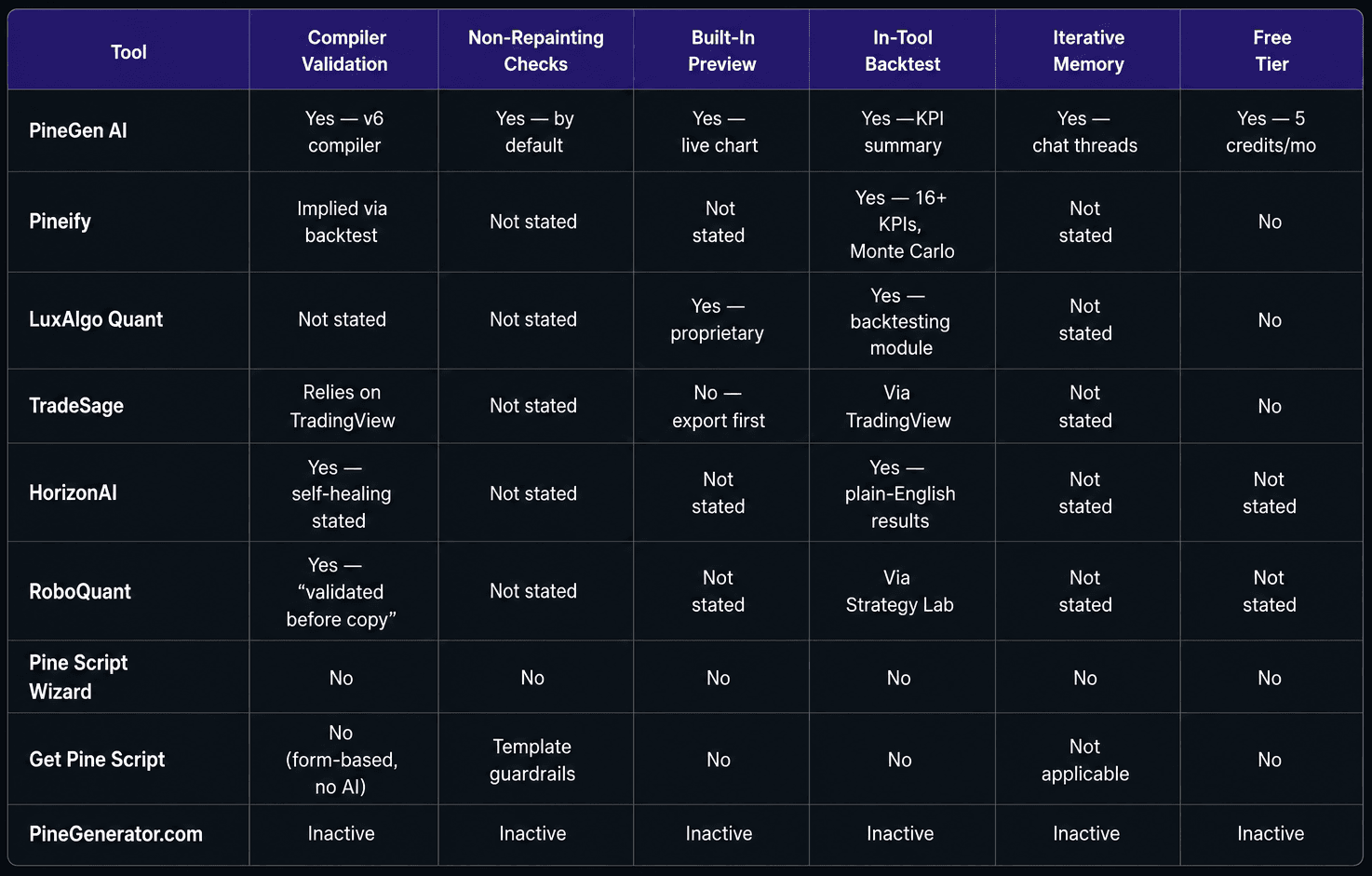
Core Capabilities
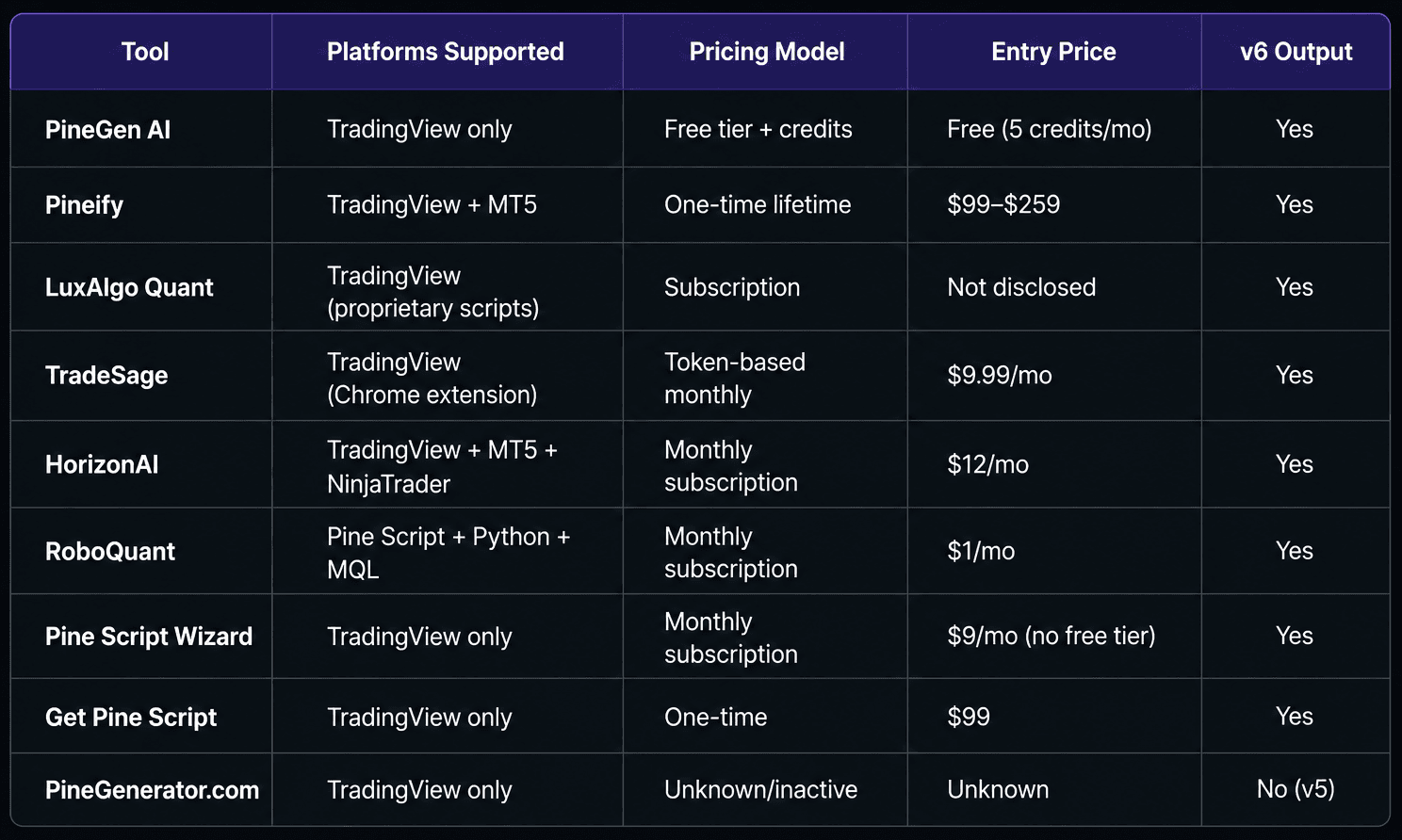
Platform and Pricing
Which Tool for Which Trader: A Decision Guide by Use Case
You are a US retail trader who wants to build, backtest, and deploy a TradingView strategy on SPY or NQ futures, starting today, without spending money before you know if the tool works.
Start with PineGen AI's free tier. Five credits per month, no credit card, and the Prompt Builder guides you through describing your logic correctly if you are new to the tool. The in-tool backtesting summary and live chart preview mean you see results inside the app before opening TradingView. How to create Pine Script with AI without any prior coding knowledge covers the prompt construction that produces the cleanest first-generation output.
You are a prop firm challenger on Topstep or Apex who needs webhook automation from TradingView to your broker.
RoboQuant is the only tool in this comparison with native webhook integration to Apex and Tradovate. If its code quality and validation standard meet your needs, the $1 to $10 pricing is the lowest available. PineGen AI generates the alert wiring inside strategy.entry() and strategy.exit() that TradingView needs for webhook alerts to route through TradersPost or TradeZella, an additional middleware step, but a well-documented one.
You are already inside the LuxAlgo ecosystem and want AI to help you combine their indicators into automated strategies.
LuxAlgo Quant is the natural choice, the AI builds off the indicator library you have already learned and paid for. Switching to a different code generation tool means re-expressing signals you already understand in a different language.
You trade both TradingView and MetaTrader 5 and want to describe a strategy once and use it on both platforms.
HorizonAI and Pineify both support this. HorizonAI extends to NinjaTrader as a third platform and includes the PDF and YouTube input features. Pineify includes the broader trading platform suite alongside the code generation. The choice between them is whether you want a specialist multi-platform code generator or a full trading OS.
You want predictable, no-AI-interpretation output from standard indicators and prefer a one-time payment.
Get Pine Script's form-based approach is the most technically predictable in the group and costs $99 once. The limitation is that your strategy must fit within the 40 preset indicator options.
You discovered Pine Script Wizard first and are wondering whether to stay or switch.
The declining traffic trend and absence of built-in preview or validation suggest the tool has not invested in the capability improvements that newer entrants have built in. At $9 per month minimum, PineGen AI's free tier provides more capability at zero cost and should be the comparison point before renewing any Pine Script Wizard subscription.
Conclusion
Eight tools. Meaningfully different approaches. One criterion that matters most for any trader who plans to run real capital against a backtest, does the tool validate its output before showing it to you, and does it screen for the repainting structure that produces optimistic simulations and underperforming live strategies?
Five tools in this comparison PineGen AI, TradeSage, HorizonAI, RoboQuant, and Pineify include some form of validation or pre-delivery testing. Three Pine Script Wizard, Get Pine Script, and PineGenerator.com do not.
The concrete next step: if you have an existing Pine Script that produces unexpected Strategy Tester results, or a v4/v5 script that throws deprecation warnings in TradingView's current editor, open PineGen AI's Smart AI Debugger with that script and see whether the validation pass identifies the source of the discrepancy. That single test tells you more about the tool's actual quality standard than any feature list.
Try out PineGen AI.
Connect with PineGen AI
- Website: https://www.pinegen.ai/
- Discord Community: https://discord.com/invite/dH9ETzQrbJ
- Twitter (X): https://x.com/PineGenAI
- Telegram Channel: https://t.me/PineGenAI
- YouTube Channel: https://www.youtube.com/@pinegenai
Start Building TradingView Strategies with PineGen AI Today
Turn trading ideas into validated strategies with AI