Is PineGen AI Worth It?
Publish Date : 8 / 5 / 2026 • 10 mins read
Last Updated : 10 / 26 / 2026
Why This Question Matters
Pine Script sits in an unusual spot. It's not a general-purpose language, so general AI coding assistants (trained mostly on Python, JavaScript, and web frameworks) treat it as a foreign dialect. They can produce something that looks like Pine Script, but they miss the rules that actually matter: how var persists across bars, when request.security() introduces repainting risk, what barstate.isconfirmed is really gating, and which functions were deprecated between v4, v5, and v6.
That mismatch has a real cost. A trader who spends an evening prompting a general AI tool for a moving-average crossover might get code that compiles cleanly and still produces a strategy tester report that's functionally meaningless, because the entry condition repaints and would never have fired that way live. The bug isn't visible in the code unless you know exactly what to look for. It's visible in the gap between the backtest and reality, which by definition you can't see until it's too late. PineGen AI's own manual-vs-AI comparison found this exact gap across multiple tools tested side by side.
And "too late" isn't just wasted evenings. Build real conviction in a strategy on a backtest that's silently inflated by a repainting entry, and the natural next step is real capital. The strategy then underperforms its backtest, and you're left in one of two bad spots. Either you blame the idea (when the idea may have been fine and the implementation broke it), or you burn hours reverse-engineering why live results don't match, hunting through code you didn't write carefully enough to debug quickly. Both are a worse use of time and capital than catching the bug before it reaches a live account, which is the entire argument for validating at generation time rather than discovering the problem downstream. The 2026 comparison of Pine Script AI tools touches on this cost directly.
There's a second, quieter cost for traders who publish scripts publicly. A published script with a repainting entry is a credibility problem, not just a technical one, and TradingView's community is sharp about spotting these. Moderators and experienced users actively scrutinize published strategies for exactly this pattern. A script flagged or rejected for repainting logic isn't just lost work. It signals that the author's other work might have the same flaw, which is harder to walk back than a single failed backtest in a private folder.
The math is asymmetric. Validating against a real compiler and tracing for repaint patterns costs seconds to minutes. Skipping it and finding out the hard way costs, at minimum, the debugging time after the fact, and at worst, real capital deployed against a strategy that was never tested the way its backtest implied.
That's why "worth it" for a Pine Script tool has to clear a narrower bar than "does it write code." The right bar is this: does it write code that behaves the way TradingView's compiler and strategy engine will actually treat it, and does it catch platform-specific failure modes before you find them the hard way.
There's also a throughput argument. If each idea takes an evening of manual coding and troubleshooting, you're testing a fraction of the ideas you could be. Compressing that loop (more ideas tested per week, less time on syntax and more on the actual trading question) is the real value proposition of any Pine Script AI tool, PineGen AI included. Not "no-code magic," but throughput.
There's a learning-curve dimension too. Pine Script isn't hard because the syntax is exotic; it's a small language. It's hard because the execution model is unusual. Scripts run bar by bar, historical and real-time behavior can diverge in ways that aren't obvious from reading the code, and the platform enforces its own rules around drawing objects, security calls, and repainting that don't map onto general programming intuition. Someone comfortable in Excel formulas or basic Python usually overestimates how much of that transfers. It transfers less than you'd think, which is exactly why a tool trained on Pine Script's real behavior produces a meaningfully different quality of output than general coding patterns with Pine Script syntax layered on top.
Consider a concrete scenario, close in spirit to the VWAP case study built with PineGen AI. A trader notices a stock tends to bounce off its 50-day moving average, and wants to formalize the observation into a testable rule. Does price actually respect that level often enough to build a strategy around, or is it a pattern their eye is inventing? That's exactly what Pine Script is for, and exactly where the gap between "compiles" and "answers the question honestly" shows up. If the script has a subtle repaint bug in how it detects the bounce, the backtest looks better than reality, and the trader walks away with false confidence in a pattern that wouldn't have worked live.
So "worth it" really splits into three sub-questions this piece answers in order.
- Does PineGen AI's code hold up technically?
- Does its workflow save real time versus manual coding?
- Does its free tier let you find out before paying anything?
Key takeaway: Judge a Pine Script tool by whether it catches platform-specific failures like repainting before they cost you time or capital, not just by whether it produces code that compiles.
What "Repainting" and "Validation" Actually Mean
Two terms this piece leans on get used loosely elsewhere, and the looseness causes real confusion. PineGen AI's own prompt engineering guide references both.
Repainting is not one thing.
It's several behaviors lumped under one word.
A few misconceptions are worth clearing up:
- Repainting is not always a bug. Some indicators repaint by nature (pivots, zigzags, anything plotting values that can only be confirmed after the fact), which is a legitimate, documented design choice as long as it's disclosed.
- Repainting is not "the indicator looks different live than in a screenshot." That can be entirely normal if the calculation is meant to update as new bars form.
- A repainting script is not always obvious from reading the code. The bug can be several logical steps removed from where the signal is plotted.
- Repainting is not fixed by dropping
barstate.isconfirmedanywhere in the script. It has to gate the specific condition that produces the trade signal, not an unrelated intermediate calculation. - A backtest that "looks great" is not proof of no repainting. Repainting bugs specifically make backtests look better than live performance would be, which is what makes them dangerous rather than merely annoying.
What repainting actually is, in the failure mode most relevant to AI-generated code, is a signal, entry, or alert that evaluates differently on a closed historical bar than it would have in real time as that bar was forming. The classic version is a strategy that appears to buy exactly at a swing low in the backtest. On the historical chart, the script can see price data from after that bar closed when it decides whether to plot the signal. Live, at the moment that bar was forming, none of that future information existed. The backtest is silently cheating with information from the future, and the strategy tester doesn't warn you.
Validation
Validation, in the specific sense this piece uses it, means confirming code compiles against TradingView's actual v6 compiler.
It is not a claim that the strategy logic is sound, and not a claim the code is repaint-free by default.
Compilation and repaint-safety are two different layers.
A script can pass compilation with zero errors and still repaint, because repainting isn't a syntax problem. It's a logic and timing problem the compiler can't detect, since the code is syntactically valid either way.
This is why "it compiled without errors" is weaker reassurance than it sounds. It rules out one category of failure (syntax and structure) while leaving the more consequential one completely untouched: logic that behaves differently live than it did historically.
A tool that checks only compilation is solving the easier half of the problem. The harder half is what this piece measures PineGen AI against: repaint-safe logic, a preview that shows you what a script does before you commit, and a backtest summary that reflects real behavior closely enough to be a useful first filter.
Key takeaway: Compilation and repaint-safety are separate layers. Passing the compiler tells you the syntax is valid, not that the strategy behaves live the way it does in the backtest.
What PineGen AI Actually Is
PineGen AI is a Pine Script v6 code generator and validator built specifically for TradingView.
That word "specifically" matters more than it sounds, because it's not a general coding tool with a Pine Script skin.
That shows up in a few concrete ways.
First, everything defaults to Pine Script v6, TradingView's current version, rather than the older v4/v5 syntax still floating around in old tutorials, forum posts, and general AI training data.
That matters because deprecated syntax doesn't always throw a hard error. Sometimes it just behaves subtly differently, or triggers a warning a beginner won't know how to read.
Second, and this is the part most tools treat as optional, every script runs against TradingView's actual v6 compiler before it's shown to you, rather than being generated and handed over on faith.
That's the difference between "text that resembles Pine Script" and "code confirmed to compile in the environment it's meant to run in."
A tool that skips this step is asking you to be the compiler, catching its syntax mistakes by trial and error inside TradingView. That's a particularly frustrating spot for a non-coder, since diagnosing a compiler error requires exactly the syntax knowledge the tool was supposed to make unnecessary.
Third, the workflow doesn't stop at code.
A live chart preview renders entries, exits, and signal markers against a real TradingView chart before you copy a single line out.
Alongside it, an in-tool backtesting summary (win rate, drawdown, profit factor, net returns) gives you a first read on behavior without a manual round trip to the Strategy Tester.
It's worth being precise about what this doesn't mean.
PineGen AI isn't a signal service or a guarantee generator.
It won't tell you a strategy will be profitable, because no legitimate tool can, and treating a clean backtest as a promise about future performance is one of the more expensive mistakes new algo traders make.
What it removes is the syntax and platform-compliance layer between "I have an idea" and "I have a working, testable script," so your time goes to evaluating the idea rather than fighting the language.
Pricing
PineGen AI has a genuinely free starting tier:
- 5 credits per month
- 1 chat thread
- Prompt Builder
- Full backtesting
- Live preview
- No credit card required
Paid tiers scale up credits and threads while adding code explanation, debugging, and priority support.
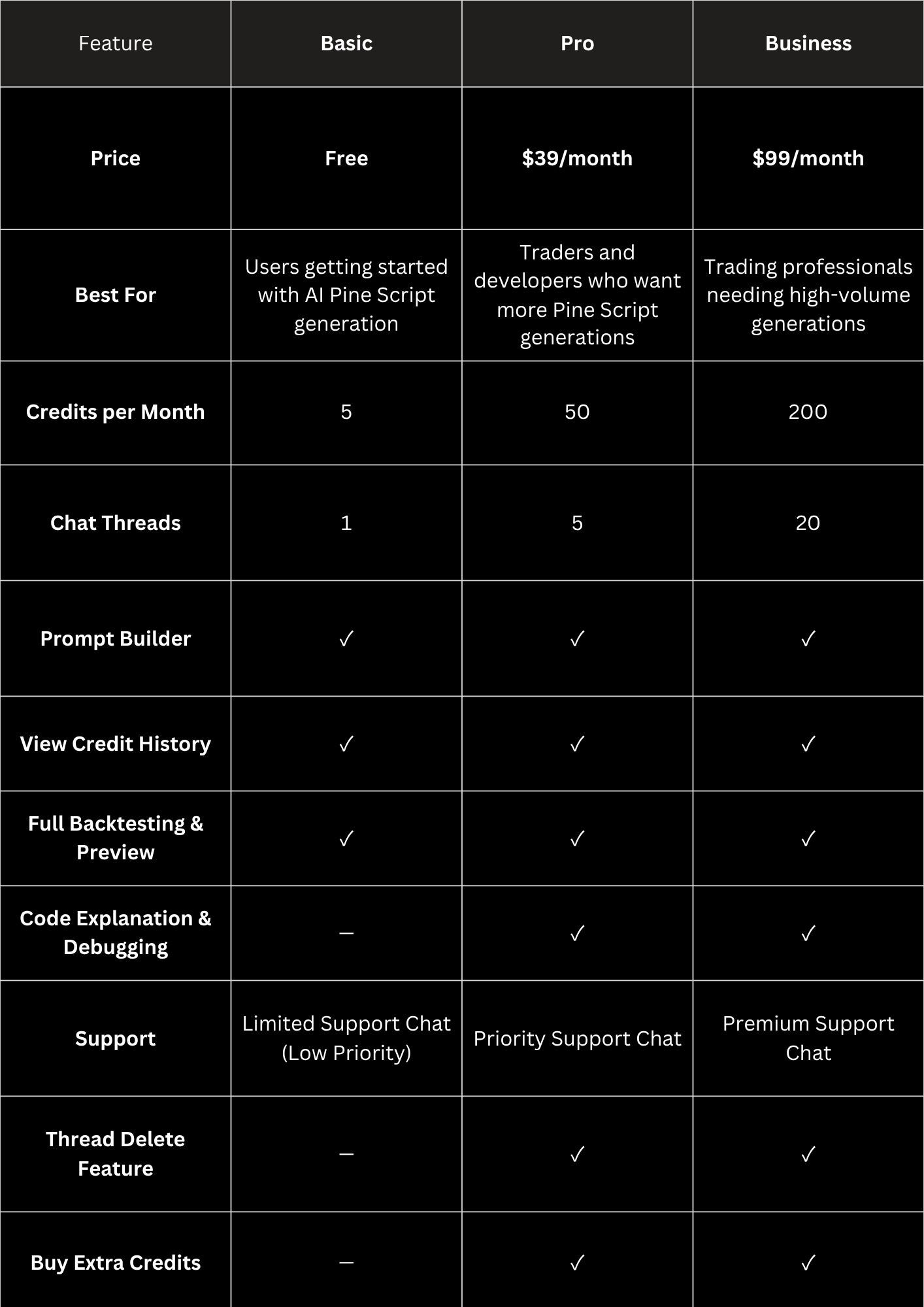
Here's who each tier actually fits:
Basic (Free)
Best for testing the waters.
Five credits is enough to run a handful of ideas through the full generate-preview-backtest loop and judge the output quality yourself without financial risk.
Pro ($39)
Best for active traders who are testing multiple strategy ideas.
Includes:
- 50 monthly credits
- 5 chat threads
- Code Explanation
- Code Debugging
- Priority Support
Business ($99)
Designed for professional strategy development.
Includes:
- 200 monthly credits
- 20 chat threads
- Premium Support
The point of the free tier is that you don't have to take any of this on faith.
Run the exact test this article describes.
Describe a real idea.
Generate it.
Check the compiled code.
Run the preview and backtest.
Judge it against your own standards before spending anything.
If the free output doesn't hold up, the paid tiers won't change the underlying code quality. They simply increase volume and support.
Key takeaway: PineGen AI defaults to Pine Script v6, validates against TradingView's real compiler before delivery, and includes live preview and backtesting even on the free tier, so you can evaluate the core workflow before paying.
How PineGen AI's Workflow Works
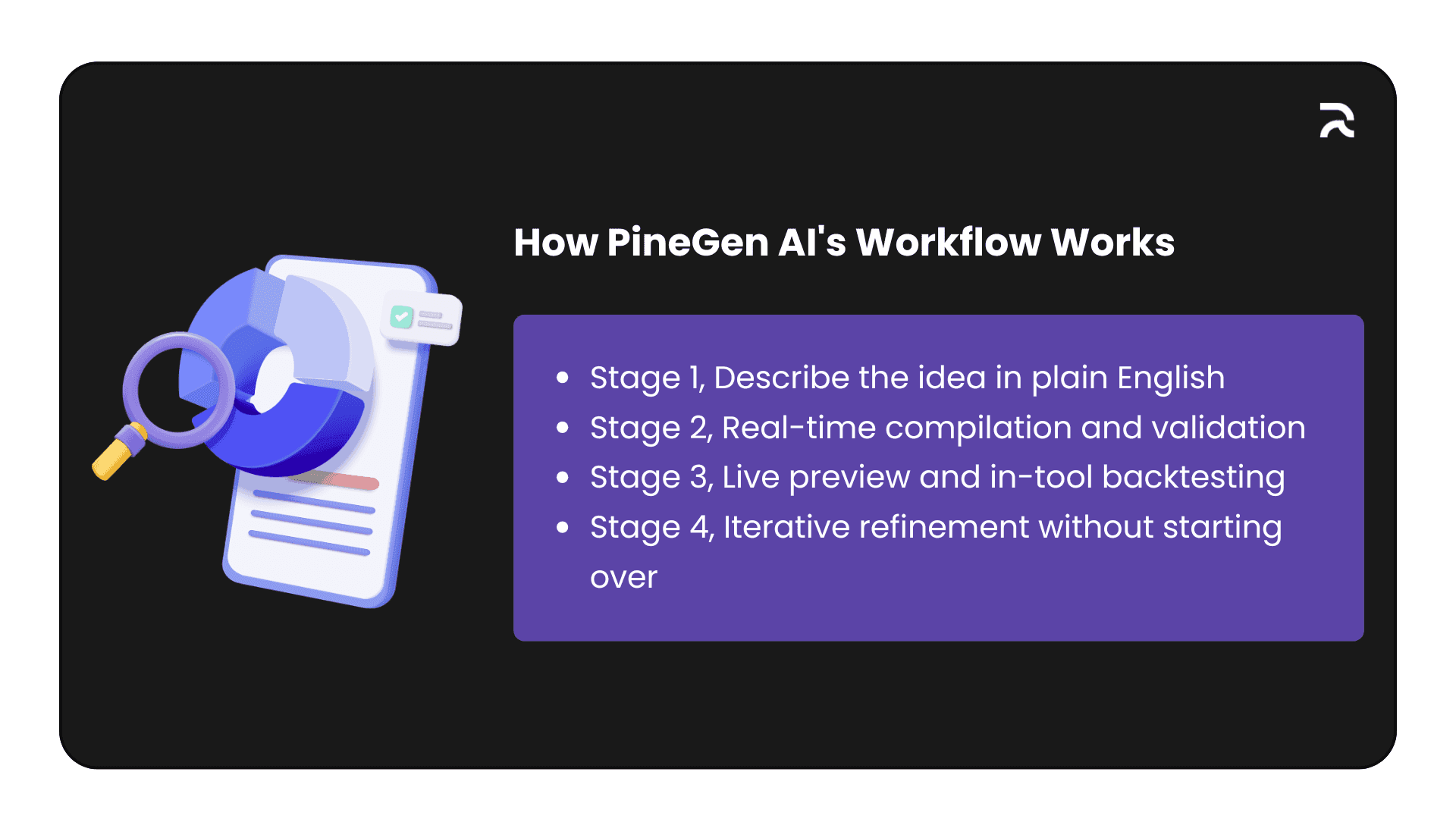
The best way to evaluate "worth it" isn't a feature list. It's walking through what happens between typing an idea and having something you'd trust enough to paper-trade. PineGen AI's workflow breaks into four connected stages, and each one solves a specific failure mode.
Why connected rather than four separate tools? Picture the manual chain. You generate code with one assistant, paste it into TradingView's editor to find syntax errors, fix those by hand, add the script to a chart to see what it does, run the Strategy Tester separately for numbers, then, to change one thing, go back to the first tool and re-describe the entire strategy because it has no memory of the conversation. Every handoff loses context. A connected workflow removes the seams where errors and lost context accumulate.
🖼️ Visual to add: A horizontal four-box diagram of the connected loop, Generate → Validate → Preview and Backtest → Iterate, with a small arrow curving from Iterate back to Generate to show the loop. Suggested alt text: "PineGen AI's four-stage workflow: generate, validate, preview and backtest, iterate."
Stage 1: Describe the idea in plain English
You describe the strategy the way you'd explain it to another trader. Something like: "Enter long when the 20 EMA crosses above the 50 EMA on the 1-hour chart, filter with RSI above 50, exit with a 1.5x ATR trailing stop." The Prompt Builder exists to help you get that description right. It's a guided structure that asks for the pieces a strategy actually needs (entry logic, exit logic, filters, risk parameters) instead of leaving you to guess what detail the AI needs.
This matters more than it sounds. Across AI Pine Script tools in general, vague prompts produce vague, often broken logic. "Use RSI for trading" specifies no threshold, direction, or exit, so the AI guesses, and guesses compound into strategies that don't reflect what you meant.
Take a before-and-after. The vague version, "create a strategy using moving averages," leaves every meaningful decision unmade: which MA type, what lengths, what the entry trigger is, what happens on the exit at all. Any AI tool has to fill those gaps with assumptions that may have nothing to do with your intent. You get code back, it compiles, and it's technically a moving-average strategy. It just isn't yours.
Now the specific version: "Generate a strategy that buys when the 50-day EMA crosses above the 200-day EMA, sells when the 50-day EMA crosses back below, sized at 10% of equity per trade." Every decision is made: indicator type, exact lengths, exact trigger on both sides, position sizing. Nothing left to guess means nothing left to guess wrong. The Prompt Builder walks you through supplying that level of detail even if you didn't think to, presenting entry logic, exit logic, filters, and risk parameters as distinct fields rather than one open text box. That structurally prevents the vague-prompt failure.
This helps beginners most, since they're the ones most likely to under-specify simply because they don't yet know what "specified enough" looks like for Pine Script. There's a compounding effect too. Filling out those fields a dozen times teaches the intuition itself (what a complete strategy description actually requires), which carries over to forum posts and eventually to manual code.
Stage 2: Real-time compilation and validation
Once you submit, PineGen AI generates the v6 code and, in the load-bearing part, compiles and validates it against TradingView's actual v6 compiler before showing it to you. This is where "AI writes code" and "AI writes usable code" diverge.
Without this step, the first moment your code meets a real compiler is when you paste it into the Pine Editor. If there's a syntax error, a deprecated function, or a type mismatch, you find out then, and now you're reading a compiler error for a script you didn't write and don't fully understand yet. For a non-coder, that's often where the whole "AI made this easy" promise collapses. By validating before delivery, PineGen AI catches its own mistakes before they become your problem.
That doesn't mean every generated strategy is logically sound. A script can compile perfectly and still have flawed trading logic. Compilation confirms the code is syntactically correct v6, with the right argument types, well-formed declarations, and valid structure. It cannot tell you whether an RSI threshold of 50 is a meaningful filter for your market, or whether a 1.5x ATR stop suits the instrument's volatility. That's a trading judgment, and no compiler can make it for you.
This is also where the Smart AI Debugger earns a distinct place. Compilation catches syntax errors in freshly generated scripts. The debugger handles a messier category: code you already have, maybe something you wrote months ago, or pulled from a forum or an old tutorial, that's broken, incomplete, or written in v4/v5 syntax TradingView now flags. Upgrading legacy code isn't find-and-replace. Going from v4 to v6 alone changes how strategies declare themselves, how security calls handle repainting, and how certain built-in variables are referenced. A debugger built for that transition understands what changed and why, rather than pattern-matching surface syntax.
Stage 3: Live preview and in-tool backtesting
This is the stage that turns "I have code" into "I have information." Instead of guessing what a script will do, or worse, running it live before reviewing the logic, you get a live chart preview with entries, exits, and signal markers rendered directly on a real TradingView chart, inside the tool.
🖼️ Visual to add: An annotated screenshot of the live chart preview with entry and exit markers, sitting next to the backtesting summary panel (win rate, maximum drawdown, profit factor, net returns). Suggested alt text: "PineGen AI live chart preview with entry and exit markers alongside the in-tool backtest KPI summary."
The in-tool backtesting summary gives you the KPIs traders check first: win rate, maximum drawdown, profit factor, and net returns. This isn't a replacement for TradingView's Strategy Tester. You should still run the final version there before drawing any real conclusions. But it's a fast first filter. If a strategy's win rate is near-random or its drawdown is already unacceptable in the preview, you know in seconds, not after a copy-paste round trip.
The underrated value here is speed of rejection. Most strategy ideas, tested honestly, don't hold up. The traders who improve fastest aren't the ones who find a great strategy on the first try. They're the ones who test and discard bad ideas quickly enough to get through a lot of them.
It helps to know what each KPI is telling you:
- Win rate is how often trades were profitable. A high win rate with a poor profit factor usually means many small wins and a few large losses, which can still lose overall.
- Profit factor (gross profit divided by gross loss) is a better single-number sanity check than win rate, because it accounts for trade size, not just count.
- Maximum drawdown is the worst peak-to-trough decline. It's arguably the number that matters most for whether you could actually stick with the strategy through a losing stretch, independent of the long-run figures.
- Net returns is the headline number, but the least useful to look at first, since a strategy can post strong returns on a drawdown profile most traders couldn't survive holding through.
Seeing all four together, immediately, changes how you triage. A solid win rate paired with a drawdown that would wipe out a third of the account gets rejected in the preview stage, before you invest more time. A mediocre win rate with a strong profit factor and manageable drawdown might earn a second look, because it's telling you the strategy cuts losses and lets winners run, even if it's not right more often than not. Fast triage is what the preview loop is for. It doesn't replace a rigorous Strategy Tester run before you risk capital, but it tells you in seconds whether an idea is worth that rigor at all.
Stage 4: Iterative refinement without starting over
Here's where Chat Continuation Memory does real work. Say your first EMA crossover backtests fine but the drawdown is higher than you'd like. Instead of re-describing the whole strategy, you follow up in the same thread: "add an ATR-based stop loss instead of a fixed percentage," or "only take longs when price is above the 200 EMA." PineGen AI keeps the session context and updates the existing strategy rather than treating your follow-up as a new request.
This sounds like a convenience feature, but in practice it's the difference between working with a collaborator and working with a vending machine. A tool with no memory forces you to reconstruct the entire description for every change, so you either write increasingly long prompts trying to anticipate every future tweak, or accept a slower cycle where each change is a fresh conversation. Neither matches how strategy development actually works, which is to build, test, adjust one variable, and test again.
Chat Thread Management extends this by keeping each strategy in its own workspace. An EMA-crossover thread and an RSI-divergence thread don't bleed into each other. That matters for anyone testing more than one idea at a time, which is most active traders, because a single mixed thread makes it easy for "add a stop loss" to apply against the wrong strategy's context, or for the model to blend two ideas into a version of neither. Separate threads remove that ambiguity structurally. They also let you return to a strategy you tested weeks ago and keep refining it with the full history intact, rather than starting the description over from memory.
Put together, these four stages are the mechanism behind "worth it." It isn't any single feature. It's that generation, validation, preview, and iteration happen inside one connected loop instead of four separate manual steps stitched across a code editor, a chart, a strategy tester, and your own memory of what you changed last.
Key takeaway: The value isn't any single feature but the connected loop of generation, validation, preview, and iteration, which removes the context lost at each handoff in a manual tool chain.
A Full Pine Script v6 Example
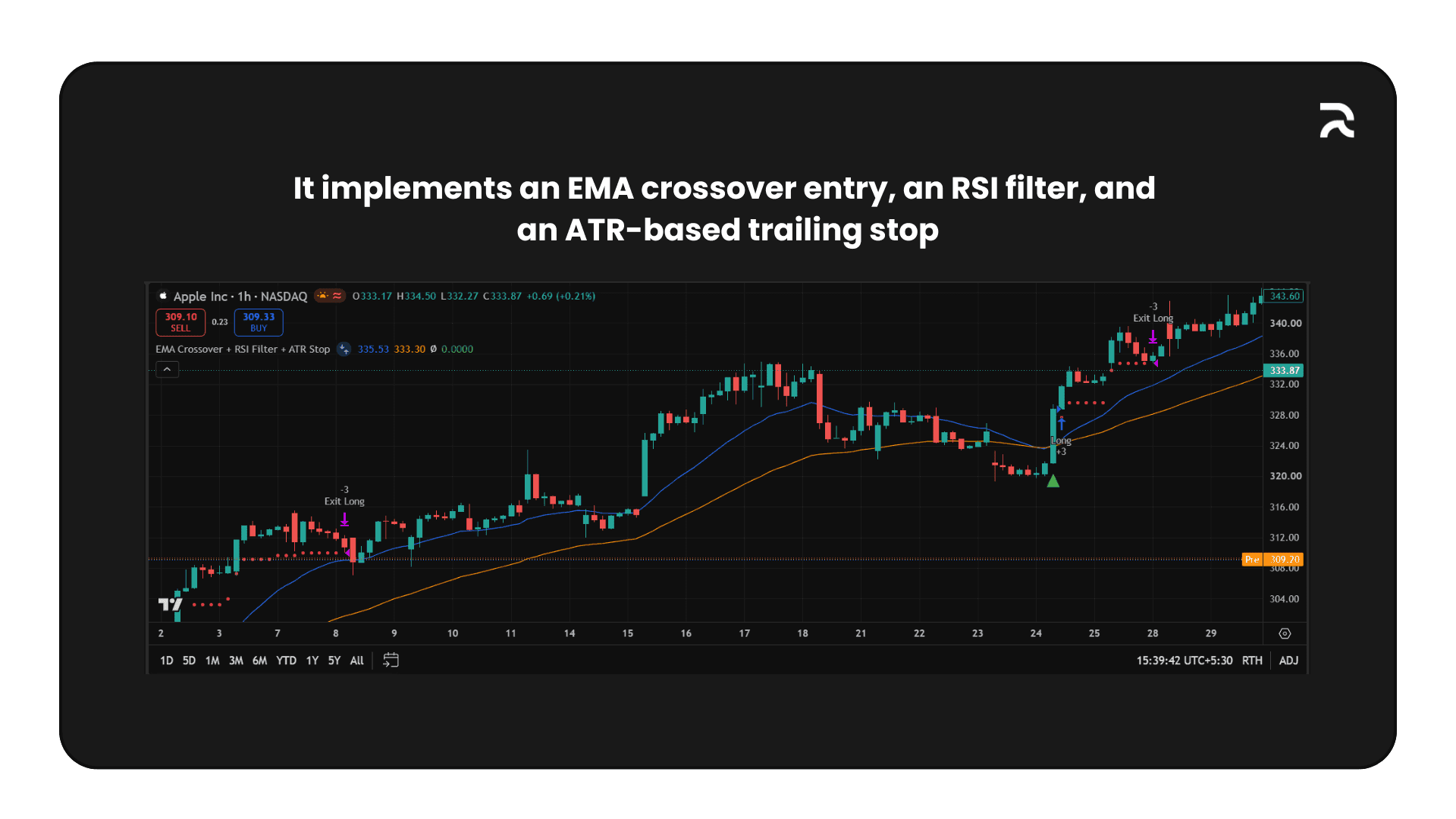
To make this concrete, here's a complete, realistic Pine Script v6 strategy, the kind of output this workflow is built to produce. It implements an EMA crossover entry, an RSI filter, and an ATR-based trailing stop, with the persistence and repaint guards generated code needs to actually be trustworthy. It's copy-paste ready for TradingView's Pine Editor.
pine//@version=6
strategy("EMA Crossover + RSI Filter + ATR Stop", overlay=true,
     default_qty_type=strategy.percent_of_equity, default_qty_value=10,
     initial_capital=10000, commission_type=strategy.commission.percent,
     commission_value=0.05)

// ---------- Inputs ----------
fastLen   = input.int(20, "Fast EMA Length", minval=1)
slowLen   = input.int(50, "Slow EMA Length", minval=1)
rsiLen    = input.int(14, "RSI Length", minval=1)
rsiFloor  = input.int(50, "Minimum RSI for Long Entry")
atrLen    = input.int(14, "ATR Length", minval=1)
atrMult   = input.float(1.5, "ATR Stop Multiplier", minval=0.1, step=0.1)

// ---------- Calculations ----------
fastEMA = ta.ema(close, fastLen)
slowEMA = ta.ema(close, slowLen)
rsiVal  = ta.rsi(close, rsiLen)
atrVal  = ta.atr(atrLen)

// ---------- Entry condition (non-persistent, resets every bar) ----------
// Avoids the common "stays true for many bars" bug: bullCross is a plain
// local, not `var`, so it only evaluates true on the bar the crossover happens.
bullCross = ta.crossover(fastEMA, slowEMA)
longCondition = bullCross and rsiVal > rsiFloor

// ---------- Repaint guard ----------
// Only allow entries on confirmed (closed) bars, and gate the final signal
// itself, not an intermediate variable, so the exposed condition can't
// repaint intrabar.
confirmedLong = longCondition and barstate.isconfirmed

// ---------- Trailing stop tracking ----------
var float trailStop = na

if strategy.position_size == 0
    trailStop := na

if confirmedLong and strategy.position_size == 0
    strategy.entry("Long", strategy.long)
    trailStop := close - atrVal * atrMult

if strategy.position_size > 0
    newStop = close - atrVal * atrMult
    trailStop := math.max(nz(trailStop, newStop), newStop)
    strategy.exit("Exit Long", from_entry="Long", stop=trailStop)

// ---------- Plots ----------
plot(fastEMA, "Fast EMA", color=color.blue)
plot(slowEMA, "Slow EMA", color=color.orange)
plot(strategy.position_size > 0 ? trailStop : na, "Trailing Stop",
     color=color.red, style=plot.style_circles)

plotshape(confirmedLong, title="Long Entry", location=location.belowbar,
     style=shape.triangleup, color=color.green, size=size.small)
A few things about this structure are worth pointing out, beyond the fact that it compiles. The entry condition (bullCross) is a plain, non-var local, and that's deliberate. A common bug in AI-generated Pine Script happens when a persistent (var) variable gets read directly into an entry condition. The state stays "true" across many bars instead of firing only on the bar the crossover happened, which silently produces a strategy that re-enters far more often than intended. Keeping the trigger non-persistent, and gating it with barstate.isconfirmed at the point it's used for the trade decision, avoids that.
The trailing stop uses var float trailStop correctly. It's meant to persist across bars while a position is open, which is exactly where var is the right tool. The distinction is genuinely subtle, and it's the kind of thing a general-purpose AI tool (trained on far more Python and JavaScript than Pine Script) is likely to get backwards, because "should this persist across iterations" doesn't map cleanly onto general programming intuition.
To make the failure mode concrete, here's the buggy version of the same entry logic, where the persistence pattern is applied to the wrong variable.
pine// ---------- BUGGY VERSION: do not use ----------
// Looks almost identical to the correct version above, but the entry flag
// itself is declared with `var`. Once it flips true, it silently stays true
// on every subsequent bar until something else resets it, producing repeated,
// unintended re-entries far beyond the bar where the crossover happened.
var bool longCondition = false

if ta.crossover(fastEMA, slowEMA) and rsiVal > rsiFloor
    longCondition := true

if longCondition and barstate.isconfirmed
    strategy.entry("Long", strategy.long)
Trace it bar by bar and the bug surfaces. On the crossover bar, longCondition correctly flips to true and the entry fires, identical to the correct version so far. But because it's declared var, it never resets to false on the next bar unless something explicitly sets it there, and nothing here does. Ten bars later, with no new crossover, longCondition is still true, and strategy.entry() fires again, and again, on every subsequent bar. The backtest report shows far more trades than the logic should ever produce: some legitimate crossover entries, many phantom re-entries.
This is precisely the repainting and logic-error pattern flagged as a common, cross-tool failure mode, and one PineGen AI's manual-vs-AI testing found across multiple tools. It's a useful example because the buggy and correct versions differ by exactly one keyword: var bool longCondition = false versus a plain, non-persistent assignment computed fresh each bar. That's how subtle the bug is. It compiles without a single error, and the only way to catch it is to trace the variable's state across many bars, not just check whether the syntax is valid. That's exactly the discipline a validation-first workflow needs to apply before showing you the code, not after you've lost time trusting a backtest.
Key takeaway: The difference between a trustworthy script and a repainting one can be a single keyword. Tracing variable state across bars, not just confirming it compiles, is what catches it.
Why PineGen AI Instead of Other Tools
General-purpose AI tools are built to write many kinds of code. PineGen AI is built for one job: producing Pine Script v6 that compiles, matches your description, and can be checked on a chart before you copy it. The differences are about how the workflow behaves, not about which tool is "smarter".
Where the difference shows up
Pine Script focus. General-purpose AI tools: a model spread across hundreds of coding languages, with no Pine-specific focus. PineGen AI: built specifically for Pine Script and trading logic.
Compiler check. General-purpose AI tools: no Pine Script v6 compiler check. Output is text from language model inference, so errors appear only after you paste the code into TradingView. PineGen AI: runs every script through its own Pine Script v6 compiler before delivery (TradingView's compiler is closed, so general tools cannot use it).
Fixing errors. General-purpose AI tools: you paste the code, read the error, describe it, wait for a fix and paste again. PineGen AI: the Smart AI Debugger fixes compiler errors and re-validates, so you receive the corrected version.
Requirement check. General-purpose AI tools: nothing confirms that every entry rule, session filter or short-side variable you described made it into the code. PineGen AI: a Requirement Validator checks the code against your original prompt, targeting 95%+ requirement coverage.
Pine Script version. General-purpose AI tools: defaults can lean toward older v4/v5 patterns unless you ask for v6. PineGen AI: trained for Pine Script v6; the version declaration and current namespaces are applied by default.
Chart preview. General-purpose AI tools: a code block only, with no entries or exits shown. PineGen AI: live in-browser chart preview (Backtesting Graph) shows entries, exits and signals on real price data before you copy the code.
Building the prompt. General-purpose AI tools: free-text only. PineGen AI: strategy Prompt Builder with 60+ indicators, entry and exit conditions, alerts and visual signals, included on the free plan.
Iteration. General-purpose AI tools: slower, because every fix goes through TradingView and back. PineGen AI: conversation threads let you modify, debug and improve a script through back-and-forth chat.
Markets. General-purpose AI tools: not specific to trading markets. PineGen AI: crypto, Forex, Indices, Stocks, Commodities and Futures.
A concrete example
The same complex prompt, an indicator combining Fair Value Gaps, Ichimoku Cloud, volume analysis, RSI, MACD, an EMA stack, order blocks and multi-timeframe confluence with ATR-based take-profit and stop-loss labels, was tested against a general-purpose AI tool. Loaded into TradingView's Pine Script Editor, it was immediately flagged for undeclared identifiers (tpShort, slShort and rrShort). The tool had written the label for short entries but never declared the variables it used. This is a common pattern in AI-generated Pine Script: the long side is fully built and the short side's variables are silently dropped. The script looks complete, and the only moment of truth is when you click Add to chart. With PineGen AI, the compiler would catch this internally, the Smart AI Debugger would fix it, and the script would be re-validated before it reached you.
Why it matters for your plan
Because the compiler check, the requirement check and the debugging happen before delivery, the credits you spend go toward improving the strategy, not toward repeating the paste, error and re-describe loop. That is also why iteration is the real value of each plan: the fewer cycles wasted on broken code, the more cycles you have for refining the idea.
Start Building TradingView Strategies with PineGen AI Today
Turn trading ideas into validated strategies with AI
Start Building TradingView Strategies with PineGen AI Today
Turn trading ideas into validated strategies with AI