How to Build a Custom Scanner in Pine Script Without Overloading TradingView
Publish Date : 9 / 3 / 2026 • 5 mins read
Last Updated : 10 / 16 / 2026
A custom Pine Script scanner works by checking a defined set of conditions (price action, indicator values, volume) across multiple symbols on a schedule, then surfacing only the ones that match. Building one lets you check dozens of symbols against your own entry criteria automatically, instead of flipping through charts one at a time.
TradingView caps how many request.security() calls a single script can make, so scanners that check more than a handful of symbols or timeframes directly will hit the “script executes too many unique requests.*() function calls” compile error. This is a hard technical ceiling, a scanner that ignores it compiles fine at 5 symbols and fails outright at 20, often after the logic is already built and tested. The fix is architectural, not a workaround: consolidate calls, limit resolution per symbol, and validate the script’s call count before it ever reaches the compiler. This guide covers ways to structure a scanner within that limit: consolidating security calls, using array-based multi-symbol requests, and capping checked timeframes per symbol, including request.security() call budgeting.
This topic is easier to follow with the basics in place, which our Pine Script v6 guide covers.
1. Why Scanners Hit TradingView’s Limit
A scanner isn’t one indicator. It’s the same check repeated across a list of symbols. That repetition is exactly where Pine Script’s resource limits bite. Every request.security() call your script makes counts against a per-script ceiling that’s independent of how clean or simple your logic is; a scanner checking RSI on 15 symbols across 2 timeframes can hit that ceiling well before the RSI logic itself is even the problem.
This is why a scanner that compiles and runs perfectly on a 5-symbol watchlist can fail outright the moment you extend it to 20. The symptom looks like a scaling problem, but it’s a call-count problem, and the two need different fixes. Some traders push scanners toward prediction; machine learning concepts explains what Pine Script can and cannot do there.
2. The request.*() Call Ceiling, Explained
TradingView documents this directly: scripts that exceed the allowed number of unique request.*() calls throw “The script executes too many unique request.() function calls.”
Each distinct symbol/timeframe/expression combination inside a request.security() call counts as a separate unique call, so a loop that looks like one line of code can silently generate dozens of unique calls under the hood if the symbol or timeframe varies per iteration.
This error often doesn’t show up while you’re building and testing on 3–4 symbols. It shows up later, when you (or someone else on the team) extends the watchlist, which means the failure is discovered at the worst possible time, mid-use, not during development. To send scanner results outside TradingView, see external API integration.
3. Consolidate Security Calls Per Symbol — Method 1
The single highest-impact fix is reducing how many distinct request.security() calls each symbol needs. If a symbol’s scan condition needs three data points, say, price, RSI, and volume, request them as three separate calls only if you must; where possible, compute derived values (like RSI) from a single fetched price series rather than requesting the indicator itself pre-calculated per symbol. Fewer unique calls per symbol means the same watchlist size fits under the ceiling with headroom to grow.
This also has a practical upside: consolidated calls tend to be faster to evaluate and easier to debug six months later, when you can’t remember why a symbol was checked three separate ways.
4. Array-Based Multi-Symbol Requests — Method 2
Rather than hardcoding a request.security() call per symbol (which scales linearly and hits the ceiling fast), structuring the scanner around an array of symbols processed through a shared function keeps the call pattern predictable and auditable. This doesn’t eliminate the underlying limit, but it makes the call budget visible and adjustable in one place:
→ Add or remove a symbol from the array, and you immediately know your new total call count, instead of hunting through repeated blocks of near-identical code.
5. Cap Resolution and Timeframes Checked — Method 3
Every additional timeframe checked per symbol multiplies your call count the same way every additional symbol does. A scanner checking 10 symbols on 1 timeframe uses a fraction of the calls that the same 10 symbols checked across 3 timeframes would. Before adding multi-timeframe confirmation to a scanner (see our guide on multi-timeframe analysis in Pine Script for how to do this without the same call-count trap elsewhere), ask:
→ Whether the scan genuinely needs it, or whether a single well-chosen timeframe covers the actual trading decision.
Scanners are meant to narrow a large list fast; the deeper multi-timeframe confirmation can happen after the scan, on the shortlist, not during it.
6. A Working Scanner Pattern (Code Example)
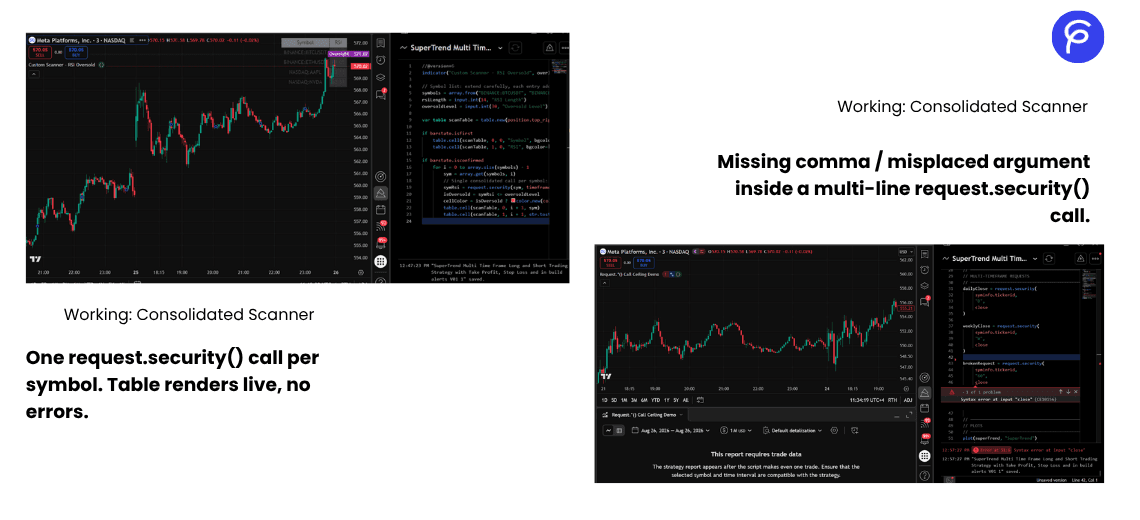
The pattern below checks a small symbol set for an RSI oversold condition, consolidating each symbol to a single request.security() call and gating the signal against barstate.isconfirmed so it doesn’t repaint on an unclosed bar.
pinescript//@version=6
indicator("Custom Scanner - RSI Oversold", overlay=false)

// Symbol list: extend carefully, each entry adds one request.security() call
symbols = array.from("BINANCE:BTCUSDT", "BINANCE:ETHUSDT", "NASDAQ:AAPL", "NASDAQ:NVDA")
rsiLength = input.int(14, "RSI Length")
oversoldLevel = input.int(30, "Oversold Level")

var table scanTable = table.new(position.top_right, 2, array.size(symbols) + 1, border_width=1)

if barstate.isfirst
   table.cell(scanTable, 0, 0, "Symbol", bgcolor=color.gray)
   table.cell(scanTable, 1, 0, "RSI", bgcolor=color.gray)

if barstate.isconfirmed
   for i = 0 to array.size(symbols) - 1
       sym = array.get(symbols, i)
       // Single consolidated call per symbol: RSI computed from the fetched close series
       symRsi = request.security(sym, timeframe.period, ta.rsi(close, rsiLength), lookahead=barmerge.lookahead_off)
       isOversold = symRsi <= oversoldLevel
       cellColor = isOversold ? color.new(color.red, 0) : color.new(color.gray, 70)
       table.cell(scanTable, 0, i + 1, sym)
       table.cell(scanTable, 1, i + 1, str.tostring(symRsi, "#.##"), bgcolor=cellColor)
A scanner often feeds a chart display, as covered in visualizing custom data.
Verification notes on this pattern: barmerge.lookahead_off is explicit on the request.security() call, so the scan doesn’t peek at unconfirmed higher-context data. The scan loop runs only if barstate.isconfirmed, so table values update once per closed bar rather than repainting mid-bar. Each symbol makes exactly one request.security() call, computing RSI from the requested close series rather than requesting a separately-calculated indicator, the consolidation described in Method 1. Extending the symbols array is the direct trade-off point: each addition is one more call against the ceiling, which is why Methods 1–3 matter more as the list grows, not less.
TradingView allows a maximum of 40 unique
request.*()calls per bar on non-Professional plans, and 64 for Professional/Ultimate plans on Pine Script v6. Uniqueness is determined by the combination of symbol, timeframe, and expression requested, evaluated at runtime, so a loop is not automatically safe just because it’s written as one line of code; each distinct combination it produces while running still counts individually.
7. Why PineGen AI vs Other Tools
A common failure mode with generic AI code generators is that they produce Pine Script text without ever running it through anything resembling TradingView’s own compiler, because that compiler is proprietary and closed, and no general-purpose AI has access to it. That means a scanner script generated this way looks complete, reads cleanly, and only reveals a request.*() call-count overrun when a trader pastes it into TradingView’s editor and the error appears, after they’ve already left the tool.
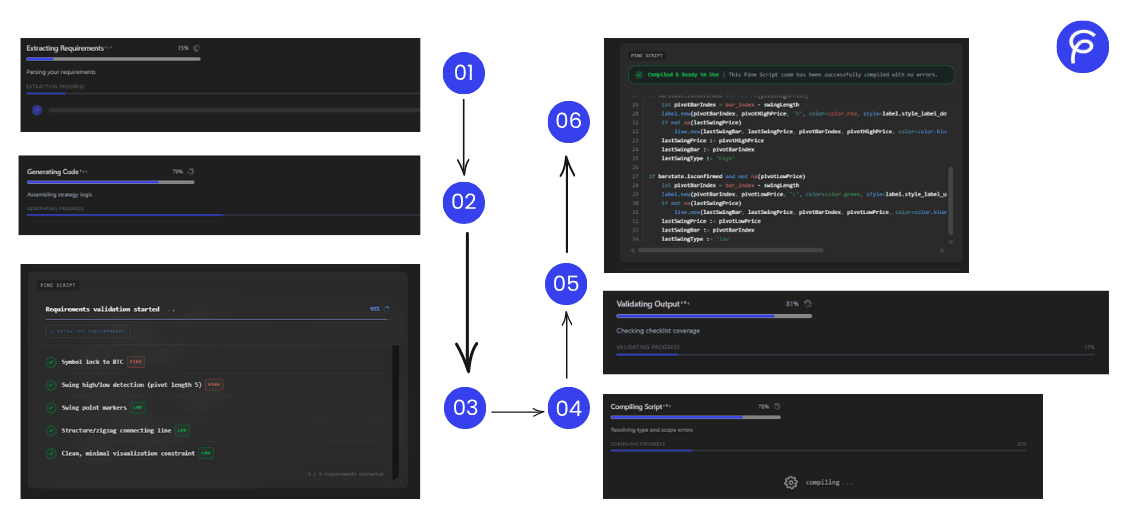
PineGen AI runs every generated script, scanners included, through its own Pine Script v6 compiler and a dedicated Requirement Validator Agent before delivery. The compiler catches structural and resource-limit issues like a call-count overrun; the Requirement Validator Agent separately confirms the scanner actually checks everything the prompt described. A symbol quietly dropped from the loop, or a timeframe check that got left out, is a requirements gap a compiler alone won’t catch. Both checks run automatically, in the same pass, before the code reaches you.
The gap between a scanner that works on your test watchlist and one that survives being scaled up isn’t a logic problem. It’s a call-count budget you have to design around from the start, not patch in after the fact. If you’re building or extending a scanner right now, the concrete next step is to count your current unique request.*() calls (symbols × timeframes × distinct expressions) before adding the next symbol, not after it throws the compile error.
→ Try building your scanner logic in PineGen AI every code runs through the Compiler and Requirement Validator automatically, so a call-count overrun gets caught before it reaches your chart.
Start Building TradingView Strategies with PineGen AI Today
Turn trading ideas into validated strategies with AI